<?xml version="1.0" encoding="utf-8"?>
<feed xmlns="http://www.w3.org/2005/Atom">

  <title><![CDATA[netsekure rng]]></title>
  <link href="http://netsekure.org/atom.xml" rel="self"/>
  <link href="http://netsekure.org/"/>
  <updated>2017-02-02T23:06:28-08:00</updated>
  <id>http://netsekure.org/</id>
  <author>
    <name><![CDATA[Nasko Oskov]]></name>
    
  </author>
  <generator uri="http://octopress.org/">Octopress</generator>

  
  <entry>
    <title type="html"><![CDATA[Chromium Internals - Lifetime of a navigation]]></title>
    <link href="http://netsekure.org/2017/02/02/chromium-internals-lifetime-of-navigation/"/>
    <updated>2017-02-02T22:44:13-08:00</updated>
    <id>http://netsekure.org/2017/02/02/chromium-internals-lifetime-of-navigation</id>
    <content type="html"><![CDATA[<p>One of the main pieces of functionality in a browser is navigation. It is
the process through which the user gets to load documents. Let us trace the
life of a navigation from the time an URL is typed in the URL bar and the
web page is completely loaded. In this post I will be using the word &ldquo;browser&rdquo; to
describe the program the user sees and not jus the browser process, which
is the privileged one in Chromium&rsquo;s security model.</p>

<p>The first step is to execute the beforeunload event handler if a document is
already loaded. It allows the page to prompt the user whether they want to
leave the current one. It is useful in cases such as forms, where the result
has not been submitted, so the form data is not lost when moving to a
new document. The user can cancel the navigation and no more work will be
performed.</p>

<p>If there is no beforeunload handler registered or the user agreed to
proceed, the next step is the browser making a network request to the
specified URL to retrieve the contents of the document to be rendered.
Chromium&rsquo;s implementation uses the term &ldquo;provisional load&rdquo; to
describe the state it is in at the start of the network request. Assuming no
network level error is encountered (e.g. DNS resolution error, socket
connection timeout, etc.), server responds with data and the response headers
come first. Once the headers are parsed, they give enough information to
determine what needs to be done next.</p>

<p>The HTTP response code allows the browser to know whether one of these
conditions has occured:</p>

<ul>
<li>A successful response follows (2xx)</li>
<li>A redirect has been encountered (response 3xx)</li>
<li>An HTTP level error has occurred (response 4xx, 5xx)</li>
</ul>


<p>There are two cases where a navigation can complete without resulting in a
new document being rendered. The first one is HTTP response code 204 and
205, which tell the browser that the response was successful, but there is
no content that follows, therefore the current document must remain active.
The other case is when the server responds with a header indicating that the
response must be treated as a download. All the data read by the browser is
then saved to the local filesystem based on the browser configuration.</p>

<p>The server can also sent a redirect, upon which the browser makes another
request based on the HTTP response code and the additional headers. It continues
following redirects until either an error or success is encountered.</p>

<p>Once there are no more redirects, if the response is not a 204/205 or a
download, the browser reads a small chunk of the actual response data that the
server has sent. By default this is used to perform <a href="https://mimesniff.spec.whatwg.org/">MIME type sniffing</a>, to
determine what type of response the server has sent. This behavior can be
suppressed by sending a “X-Content-Type-Options: nosniff” header as part of the
response headers. At this point the browser is ready to switch to rendering the
new document.  In Chromium&rsquo;s implementation, this term used for this point in
time is &ldquo;commit&rdquo;. Basically the browser has committed to rendering the new
document and remove the old one.</p>

<p>However, before the commit is performed, the old document needs to be
notified that it is going away, so the browser executes the unload event
handler of the old document, if one is registered. Once that is complete, the
old document is no longer active, the new document is committed, and in
strict terms, the navigation is complete.</p>

<p>The astute reader will realize that even though I said navigation is
complete, the user actually doesn&rsquo;t see anything at this point. Even though
most people use the word navigation to describe the act of moving from one
page to another, I think of that process as consisting of two phases. So far
I have described the navigation phase and once the navigation has been
committed, the browser moves into the loading phase. It consists of reading
the remaining response data from the server, parsing it, rendering the
document so it is visible to the user, executing any script accompanying
it, as well as loading any subresources specified by the document. The main
reason for splitting it into those two phases is how errors are handled.</p>

<p>This brings us back to the case where the server responds with an error
code. When this happens, the browser still commits a new document, but that
document is an error page it either generates based on the HTTP response
code or reads as the response data from the server. On the other hand, if a
successful navigation has committed a real document from the server and has
moved to the loading phase it is still possible to encounter an error, for
example a network connection can be terminated or times out. In that case
the browser is displaying as much of the new document as it has parsed.</p>

<p>Chromium exposes the various stages of navigation and document loading
through methods on the WebContentsObserver interfce.</p>

<p>Navigation</p>

<ul>
<li>DidStartNavigation - invoked at the point after executing the beforeunload event handler and before making the initial network request.</li>
<li>DidRedirectNavigation - invoked every time a server redirect is encountered.</li>
<li>ReadyToCommitNavigation - invoked at the time the browser has determined that it will commit the navigation.</li>
<li>DidFinishNavigation - invoked once the navigation has committed. It can be either an error page if the server responded with an error code or the browser has switched to the loading phase for the new document on successful response.</li>
</ul>


<p>Document loading</p>

<ul>
<li>DidStartLoading - invoked when a navigation is about to start, after executing the beforeunload handler.</li>
<li>DocumentLoadedInFrame - invoked when the document itself has completed loading, however it does not mean that all subresources have completed loading.</li>
<li>DidFinishLoad - invoked when the document and all of its subresources have been loaded.</li>
<li>DidStopLoading - invoked when the document, all of its subresources, all subframes and their subresources have completed loading.</li>
<li>DidFailLoad - invoken when the document load failed, for example due to network connection termination before reading all of the response data.</li>
</ul>


<p>Hopefully this post gives a good introduction to navigations in the browser
and should be a good base to build on for future posts.</p>
]]></content>
  </entry>
  
  <entry>
    <title type="html"><![CDATA[Chromium Internals - Process Model]]></title>
    <link href="http://netsekure.org/2016/03/30/chromium-internals-process-model/"/>
    <updated>2016-03-30T22:06:45-07:00</updated>
    <id>http://netsekure.org/2016/03/30/chromium-internals-process-model</id>
    <content type="html"><![CDATA[<p>Chromium was designed from the very start as a multiprocess browser. Most
people think it has one process for each tab and while that is somewhat
close to the truth, the real picture is a bit more complicated. It supports
a few different modes of operation which differ in how web pages are
assigned to processes. Those are called &ldquo;process models&rdquo;. It is highly
recommended to read the
<a href="http://netsekure.org/2015/11/23/chromium-internals-security-principal-in-chromium/">previous</a>
<a href="http://netsekure.org/2015/12/06/chromium-internals-documents-windows-browsing-contexts/">posts</a>
introducing some basic concepts used by Chromium, which I will use to
explain how the different process models work.</p>

<p>Chromium uses the operating system process as a unit of isolation. It uses
Blink to render web documents, which it runs in restricted renderer
processes. The sandbox does not allow any renderer processes to communicate
between each other and the only way to achieve that is to use the browser
process as an intermediary. This design allows us to isolate web pages from
each other and potentially have a different level of privileges for each
process.</p>

<p>Before delving into the actual models the browser supports, there are couple
of more bits of detail to cover - cross-process navigation and SiteInstance
caveats.</p>

<h3>Cross-process navigation</h3>

<p>A tab in the browser UI gets a visual representation of the web page from
the renderer process and draws it as its content. When navigating from one
page to another, the browser makes a network request and gives the response
to Blink for rendering. Often, the same instance of the rendering engine,
running in the same process, is used. However, in many cases, navigations
can result in a new renderer process being created and a brand new instance
of Blink being instantiated. The response is handed off to the new renderer
process and the tab is then associated with the new process.</p>

<p>The ability to perform cross-process navigations is a core part of
Chromium’s design. It incurs the cost of starting a new process, however it
also improves performance, as using a new process has a clear memory space,
free of fragmentation. Abandoning the old process can be quick (process
kill) and also helps mitigate memory leaks, as that process exits and its
memory is released back to the operating system. Most importantly, though,
changing processes under the hood is a key building block of the security
model.</p>

<p>Chromium’s security model also allows for different privilege levels for
content being rendered. In general any content coming from the web is
considered lowest privilege level. Chromium internal pages, such as
chrome://settings, require more privileges, as they need to read or modify
settings or data available only in the browser process. The security model
does not allow pages from different privilege levels to use the same
process, so a cross-process navigation is enforced when crossing privilege
level.</p>

<h3>SiteInstance caveats</h3>

<p>Previous posts in this series described SiteInstance and said that in the
example setup, all of a.com, b.com, c.com, d.com were SiteInstances. This is
the ideal model to use and is the goal of the &ldquo;Site Isolation&rdquo; project, but
currently Chromium does not reflect this in reality. Here is a list of
caveats that apply to the default Chromium configuration at the time of this
post:</p>

<ul>
<li><p>SiteInstance is assigned only to the top-level frame by default. Subframes
share the same one as the main frame.</p></li>
<li><p>SiteInstance does not always reflect the URL of the current document. Once
the SiteInstance URL is set, it doesn’t change, even though the frame can
navigate across many different Sites. However, SiteInstance can change
when navigating cross-site.[1]</p></li>
</ul>


<p>Chromium avoids process swaps on cross-site renderer-initiated navigations
(e.g.  link clicks) because those would be likely to break script calls on
windows that expect to communicate with each other (and thus break
compatibility with the web). In contrast, it tends to use process swaps on
cross-site browser-initiated navigations (e.g. typing URL in the omnibox)
because the user is making an effort to leave the site, so it&rsquo;s not as bad
to break the script calls.</p>

<h3>Process models</h3>

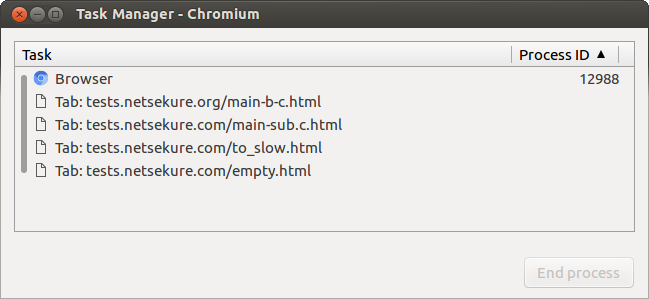
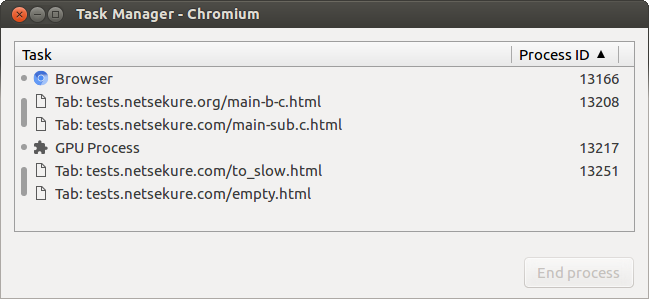
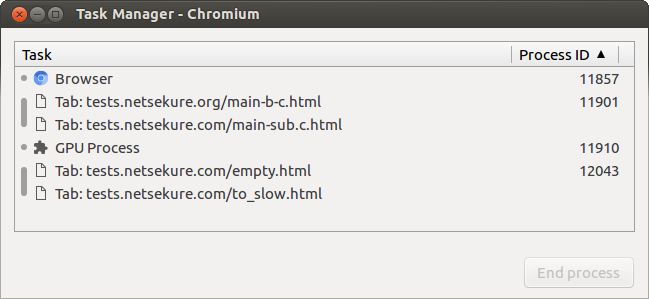
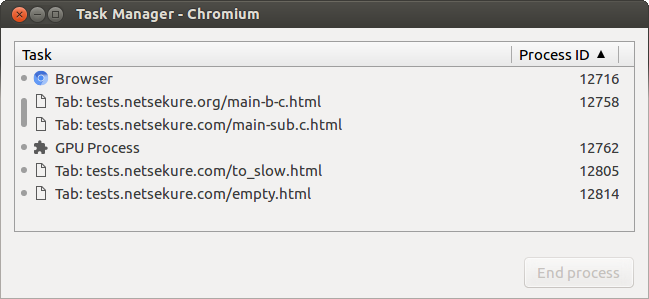
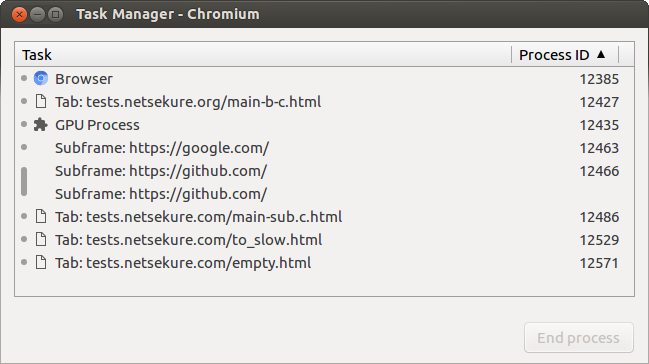
<p>To help illustrate the difference between the different process models, I
have included screenshots of the Chromium Task Manager showing the processes
and what URLs they are rendering. The setup I have used is the following:</p>

<ul>
<li><p>Tab navigated to
<a href="http://tests.netsekure.org/main-b-c.html">http://tests.netsekure.org/main-b-c.html</a>.
The main document includes two iframes - one to
<a href="https://google.com">https://google.com</a> and one to
<a href="https://github.com">https://github.com</a>. It also contains a button that
opens a new tab through window.open() call. It causes the new tab to be in
the same BrowsingInstance as the tab that opened it.</p></li>
<li><p>Newly opened tab from the initial tab, which is navigated to
<a href="http://tests.netsekure.com/main-sub.c.html">http://tests.netsekure.com/main-sub.c.html</a>.
Notice that it is different top level domain from the initial tab (.org vs .com).
It includes an iframe to <a href="https://pages.github.com">https://pages.github.com</a>.</p></li>
<li><p>User opened tab navigated to <a href="http://tests.netsekure.com/empty.html">http://tests.netsekure.com/empty.html</a></p></li>
<li><p>User opened tab navigated to <a href="http://tests.netsekure.com/to_slow.html">http://tests.netsekure.com/to_slow.html</a></p></li>
</ul>


<p>At the time of this post, the current set of process models is:</p>

<ul>
<li><p>Single process</p></li>
<li><p>Process per tab</p></li>
<li><p>Process per Site</p></li>
<li><p>Process per Site instance (default)</p></li>
<li><p>Site per process (experimental)</p></li>
</ul>


<h4>Single process</h4>

<p>This is a mode in which Chromium does not use multiple processes. Rather, it
combines all of its parts into a single process. It is also a mode in which
there is no sandboxing, as the browser needs access to both the network and
the filesystem. It exists mainly for testing and <strong>it</strong><strong> should never be
used!</strong></p>

<p><img src="http://netsekure.org/images/single-process.png" alt="--single-process" /></p>

<h4>Process per tab</h4>

<p>This process model is the simplest one to understand and is what most people
intuitively think is the mode of operation of the browser. Each tab gets a
dedicated sandboxed process that runs the Blink rendering engine.
Navigations do not usually change processes. Note however that since the
security model does not allow for content with different privileges to live
in the same process, it does actually change processes on privilege change.
An example would be navigation from
<a href="https://dev.chromium.org">https://dev.chromium.org</a> to chrome://settings.</p>

<p><img src="http://netsekure.org/images/process-per-tab.png" alt="--process-per-tab" /></p>

<h4>Process per Site</h4>

<p>In this process model, each Site gets mapped to a single process. When
multiple tabs are navigated to the same Site, they will all share the same
process. Navigations can change processes.</p>

<p>It is not the default model, since running multiple tabs with heavy web
pages, such as Google Docs, leads to low performance - too much contention
on the main thread, memory fragmentation, etc.</p>

<p><img src="http://netsekure.org/images/process-per-site.png" alt="--process-per-site" /></p>

<h4>Process per Site instance</h4>

<p>This is the default process model for Chromium. Each SiteInstance is mapped
to a process by default. Multiple tabs navigated to the same Site end up in
separate SiteInstances, therefore they reside in separate processes.
Navigations also can change processes. All the SiteInstance caveats apply
and not the idealized version of SiteInstance.</p>

<p><img src="http://netsekure.org/images/process-per-site-instance.png" alt="Default mode" /></p>

<h4>Site per process</h4>

<p>This is an experimental process model for developing the &ldquo;Site Isolation&rdquo;
project. It comes closer to the desired design for Chromium, where there is
a SiteInstance for each frame. Additionally, it is using the idealized
definition of SiteInstance, where only URLs from the same SiteInstance can
be loaded in the same process. Navigations can change processes in any frame
on a page, whereas all other process models support changing processes only
on the top frame.</p>

<p><img src="http://netsekure.org/images/site-per-process.png" alt="--site-per-process" /></p>

<p>I hope these posts have helped demystify a bit how the Chromium makes
decisions on which process to use for specific tab and URL. If there are
other clarifications I can make, feel free to ping me over on Twitter and I
would be happy to.</p>
]]></content>
  </entry>
  
  <entry>
    <title type="html"><![CDATA[Chromium Internals - Documents, Windows, Browsing Contexts]]></title>
    <link href="http://netsekure.org/2015/12/06/chromium-internals-documents-windows-browsing-contexts/"/>
    <updated>2015-12-06T17:19:03-08:00</updated>
    <id>http://netsekure.org/2015/12/06/chromium-internals-documents-windows-browsing-contexts</id>
    <content type="html"><![CDATA[<p>In a <a href="http://netsekure.org/2015/11/23/chromium-internals-security-principal-in-chromium/">previous post</a>, I covered the basic security
principal that Chromium uses for its security model. The goal of this post
is to outline few details that are vital to understand the limitations
imposed on the process model. It will look at somewhat obvious parts of the
web platform framed in HTML spec speak.</p>

<p>When a browser is navigated to an URL, it makes a network request to the
server specified for the document identified in the URL. The response is a
<em>document</em> *, which is then parsed and rendered in a <em>window</em>. Those should be
familiar, since they correspond to the identically named objects in
JavaScript. This holds true for iframes as well, which have their own window
objects, which host the respective documents. The HTML spec uses different
naming for window - <a href="https://html.spec.whatwg.org/multipage/browsers.html#windows">“browsing context”</a>, while it keeps
document as the same concept. There are a few types defined by the standard:</p>

<ul>
<li>top-level browsing context - the main window for a page</li>
<li>nested browsing context - window embedded in a different window, for example through &lt;iframe&gt; tag</li>
<li>auxiliary browsing context - a top-level browsing context “related” to
another browser context, or put in simpler speak - any window created
through window.open() API, or a link with target attribute.</li>
</ul>


<p>I will use frame to refer generically to any browsing context - be it a page
or an iframe, as they are basically the same concept with two different
names based on the role they play.</p>

<p>There are two concepts the HTML spec defines that are important to
understand. The first one is <a href="https://html.spec.whatwg.org/multipage/browsers.html#directly-reachable-browsing-contexts">“reachable browsing context”</a>.
This is somewhat intuitive, as all frames that are part of a web page are
reachable to each other. In JavaScript this is exposed through the
window.parent and window.frames properties. In addition, related browsing
contexts are reachable too, by using the return value of window.open() and
the window.opener property. For example, if we have a page with two iframes,
which opens a new window with an iframe, then all of the frames are
reachable.</p>

<p><img class="center" src="http://netsekure.org/images/two-pages-with-frames.png" title="'Two web pages with frames'" ></p>

<p>The set of reachable frames - all of them in the above case - form the other
concept the standard defines - <a href="https://html.spec.whatwg.org/multipage/browsers.html#unit-of-related-similar-origin-browsing-contexts">“unit of related browsing contexts”</a>.
It is important because documents that want to communicate with other
documents are allowed to do so only if they are part of the same unit of
related browsing contexts. Internally, the Chromium source code uses the
BrowsingInstance class to represent this concept. For the sake of brevity,
I’ll use this name from here on.</p>

<p>When two documents want to communicate with each other, they need to have a
reference to the window object of the target document. Any frame in a
BrowsingInstance can get a reference to any other frame in the same
BrowsingInstance since they are all reachable by definition.</p>

<p>How documents can interact with each other is governed by the <a href="https://developer.mozilla.org/en-US/docs/Web/Security/Same-origin_policy">same origin policy</a>.
When documents are from the same origin or can relax their
origin to a common one, they are allowed to access each other directly.
Cross-origin documents on the other hand are not allowed such access. So a
BrowsingInstance can be split in sets of frames and grouped by the origin
they are from. But <a href="http://netsekure.org/2015/11/23/chromium-internals-security-principal-in-chromium/">recall</a> that we can’t easily use the
origin as a security principle in Chromium. This is why we use the concept
of SiteInstance - the set of frames in a BrowsingInstance which host
documents from the same Site. It is vital to remember that the Chromium
browser process makes all of its process model and isolation decisions based
on SiteInstance and <em>not</em> based on origins.</p>

<p>The HTML spec requires all same origin documents, which are part of the same
unit of related browsing contexts, to run on the same event loop - or in
other words the same thread of execution within a process. This means that
all frames which are part of the same SiteInstance must execute on the same
thread, however different SiteInstances can run on different ones. In the
example above, the two pages are in the same BrowsingInstance because they are
related through the window.open() call. The different SiteInstances should
be for a.com, b.com, c.com, d.com.</p>

<p>Overall it all boils down to the following rules that Chromium needs to abide by:</p>

<ul>
<li>All frames within a BrowsingInstance can reference each other.</li>
<li>All frames within a SiteInstance can access each other directly and must run on the same event loop.</li>
<li>Frames from different SiteInstances can run on separate event loops.</li>
</ul>


<p>Phew! Now there is enough background to start delving into the details of
Chromium&rsquo;s implementation of these concepts from the HTML spec and its
process allocation model.</p>

<h6>* Unless the result is a file to be downloaded or handled by external application.</h6>
]]></content>
  </entry>
  
  <entry>
    <title type="html"><![CDATA[Chromium Internals - Security Principal in Chromium]]></title>
    <link href="http://netsekure.org/2015/11/23/chromium-internals-security-principal-in-chromium/"/>
    <updated>2015-11-23T21:32:40-08:00</updated>
    <id>http://netsekure.org/2015/11/23/chromium-internals-security-principal-in-chromium</id>
    <content type="html"><![CDATA[<p>I have seen many people versed in technology and security make incorrect
statements about how Chromium’s multi-process architecture works. The most
common misconception is that each tab gets a different process. In reality,
it is somewhat true, but not quite. Chromium supports a few different modes
of operation and depending on the policy in effect, process allocation is
done differently.</p>

<p>I decided to write up an explanation of the default process model and how it
actually works. The goal is for it to be comprehensible to as many people as
possible, not requiring a degree in Computer Science. However, basic
familiarity with the web platform (HTML/JS) is expected. In order to get to
it, there are some concepts that need to be defined, so this is the first
post in a series, which will explain some of Chromium’s internals and
demystify some parts of the HTML spec.</p>

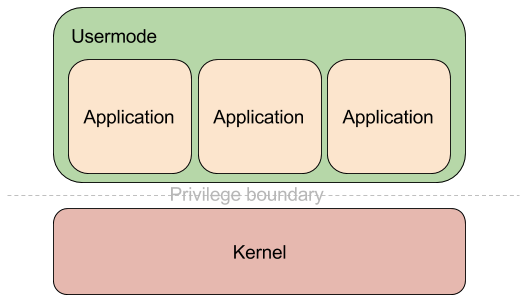
<p>I have found the easiest mental model of the Chromium architecture to be
that of an operating system - a kernel running in high privilege level and a
number of less privileged usermode application processes. In addition, the
usermode processes are isolated from each other in terms of address space
and execution context.</p>

<p><img class="center" src="http://netsekure.org/images/os-model-diagram.png" title="'OS Model'" ></p>

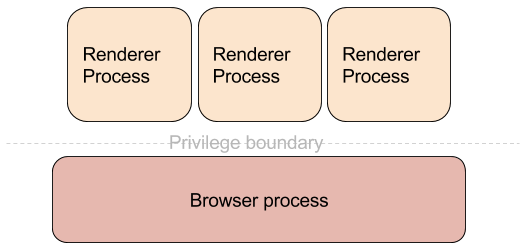
<p>The equivalent of the kernel is the main process, which we call the “browser
process”. It runs with the privileges of the underlying OS user account and
handles all operations that require regular user permissions - communication
over the network, displaying UI, rendering, processing user input, writing
files to disk, etc. The equivalent of the usermode processes are the various
types of processes that Chromium’s security model supports. The most common
ones are:</p>

<ul>
<li>Renderer process - used for parsing and rendering web content using the Blink rendering engine</li>
<li>GPU process - used for communicating with the GPU driver of the underlying operating system</li>
<li>Utility process - used for performing untrusted operations, such as parsing untrusted data</li>
<li>Plugin process - used for running plugins</li>
</ul>


<p>They all run in a sandboxed environment and are as locked down as possible for
the functionality they perform.</p>

<p><img class="center" src="http://netsekure.org/images/chrome-model-diagram.png" title="'Chrome Model'" ></p>

<p>In the modern operating systems design, the principle of <a href="https://en.wikipedia.org/wiki/Principle_of_least_privilege">least privilege</a>
is key and separation between different user accounts is fundamental.
User account is a basic unit of separation and I would refer
to from here on to this concept as “security principal”. Each operating
system has a different way of representing security principals, for example
<a href="https://en.wikipedia.org/wiki/User_identifier">UIDs</a> in Unix and <a href="https://msdn.microsoft.com/en-us/library/windows/desktop/aa379571(v=vs.85).aspx">SIDs</a> in Windows, etc. On the web, the
security principal is the <a href="https://tools.ietf.org/html/rfc6454">origin</a> - the combination of the scheme,
host, and port of the URL the document has originated from. Access control
on the web is governed by the <a href="https://developer.mozilla.org/en-US/docs/Web/Security/Same-origin_policy">Same Origin Policy (SOP)</a>, which
allows documents that belong to the same origin to communicate directly with
each other and access each other synchronously. Two documents that do not
belong to the same origin cannot access each other directly and can only
communicate asynchronously, usually through the <a href="https://developer.mozilla.org/en-US/docs/Web/API/Window/postMessage">postMessage API</a>.
Overall, the same origin policy has worked very well
for the web, but it also has some quirks, which make it unsuitable to treat
origins as the security principal for Chromium.</p>

<p>The first reason comes from the <a href="https://html.spec.whatwg.org/multipage/index.html">HTML specification</a> itself. It
allows documents to “relax” its origins for the purpose of evaluating same
origin policy. Since the origin contains the full domain of the host serving
the document, it can be a subdomain, for example “foo.bar.example.com”. In
most cases, however, the example.com domain has full control over all of its
subdomains and when documents that belong in separate subdomains want to
communicate directly, they are not allowed due to the restrictions of same
origin policy. To allow this scenario to work, though, documents are allowed
to change their domain for the purposes of evaluating SOP. In the case
above, “foo.bar.example.com” can relax its domain up to example.com, which
would allow any document on example.com itself to communicate with it. This
is achieved through the <a href="https://html.spec.whatwg.org/multipage/browsers.html#relaxing-the-same-origin-restriction">“domain”</a> property of
the document object. It does come with restrictions though.</p>

<p>In order to understand the restrictions of what document.domain can be set
to, one needs to know about the <a href="https://publicsuffix.org/">Public Suffix List</a> and how it fits in
the security model of the web. Top-level domains like “com”, “net”, “uk”,
etc., are treated specially and no content can (should) be hosted on those.
Each subdomain of a top-level domain can be registered by different entity
and therefore must be treated as completely separate. There are cases,
however, where they aren’t a top-level domain, but still act as such. An
example would be “co.uk”, which serves as a parent domain for commercial
entities in the UK to register their domains. Because those cases are
effectively in the role of a top-level domain, but are not one, the public
suffix list exists as a comprehensive source for browsers and other software
to use.</p>

<p>Now that we know about PSL, let’s get back to document.domain. A document
cannot change its domain to be anything completely generic or very
encompassing, such as “.”. Browsers allow documents to relax their domain up
the DNS hierarchy. To use the example from above, “foo.bar.example.com” can
set its domain to “bar.example.com” or “example.com”. However, since “.com”
is a top-level domain, allowing the document to set its domain to “.com”
will lead to security problems. It will allow the document to potentially
access documents from any other “.com” domain. Therefore browsers disallow
setting the domain to any value in the Public Suffix List and enforce that
it must be a valid format of a domain under one of the entries in the PSL.
This concept is often referred to as “eTLD+1” - effective top-level domain
(a.k.a. entry in the PSL) + one level of domains under it. I will use this
naming for brevity from here on.</p>

<p>It is this behavior defined by the HTML spec allowing documents to change
their origins that gives us one of the reasons we cannot use the origin as a
security principal in our model. It can change in runtime and security
decisions made in earlier point in time might no longer be valid. The
consistent part that can be taken from the origin is only the eTLD+1 part.</p>

<p>The next oddity of the web is the concept of <a href="https://tools.ietf.org/html/rfc6265">cookies</a>. It is
quite possibly the single most used feature of the web today, but it has its
fair share of strange behaviors and brings numerous security problems with
it. The problems stem from the fact that cookies don’t really play very well
with origins. Recall that origin is the tuple (scheme, host, port), right?
The spec however is pretty clear that “Cookies do not provide isolation by
port”. But that isn’t all, the spec goes to the next paragraph and says
“Cookies do not provide isolation by scheme”. This part has been patched up
as the web has evolved though and the notion of “Secure” attribute on
cookies was introduced. It marks cookies as available only to hosts running
over HTTPS and since HTTP is the other most used protocol on the web, the
scheme of an origin is somewhat better isolated and port numbers are
completely ignored when cookies are concerned. So basically it is impossible
to use origin as a security principal to use and perform access controls
against cookie storage.</p>

<p>Finally there is enough background to understand the security principal used
by Chromium - <em>site</em>. It is defined as the combination of scheme and the eTLD+1
part of the host. Subdomains and port numbers are ignored. In the case of
https&#58;//foo.bar.example.com:2341 the effective <em>site</em> for it will be
https&#58;//example.com. This allows us to perform access control in a web
compatible way while still providing a granular level of isolation.</p>
]]></content>
  </entry>
  
  <entry>
    <title type="html"><![CDATA[How to approach forking Chromium]]></title>
    <link href="http://netsekure.org/2015/01/18/how-to-approach-forking-chromium/"/>
    <updated>2015-01-18T19:40:17-08:00</updated>
    <id>http://netsekure.org/2015/01/18/how-to-approach-forking-chromium</id>
    <content type="html"><![CDATA[<p>One really nice thing about Chromium is its source code is open and released under
the BSD license. This allows people to reuse code, extend the browser, or
fully fork the project. Each of those are probably worthy of a blog post on
its own, but I will focus only on the last one.</p>

<p>Taking Chromium and forking it is fairly easy process, just clone
<a href="https://chromium.googlesource.com/chromium/src.git">the repository</a>. Make all the changes you would like to do -
add missing features, include enhancements, create a totally new UI - it is
only limited by one&rsquo;s imagination. Building the binary from the source code
is a little bit laborious, though not too hard. It does take beefy hardware
and some time. Once it is built, publishing it is deceptively easy.
However, what comes next?</p>

<p>Software in today&rsquo;s world is not static. As a <a href="https://twitter.com/fugueish">colleague of mine</a>
likes to say - it is almost like a living organism and continuously evolves.
There is no shipping it as it was the norm in the &lsquo;90s. The web is in a
constant release mode and its model of development has trickled to client
side software - be it desktop or mobile apps. Chromium has adopted this model
from its initial release and is updating on a very short cycle - currently
averaging six weeks between stable releases and two weeks between
intermediate stable updates. It is this constant change that makes forking
it a bit more challenging. However, there are few steps that one can take to
ensure a smoother ride.</p>

<h3>Infrastructure</h3>

<p>With constantly changing codebase, having a continuous build system is a must
for project as big as Chromium and is very useful even for much smaller
projects. Setting one up from the get go will be tremendously useful if
there is more than one developer working on the code. Its value is even
higher if the project needs to build on more than one platform.</p>

<p>What is more important and I would argue it is a must - using a continuous
integration system. Running tests on each commit (or thereabout) to ensure
there are no breaking changes. It is a requirement for any software project
that needs to be in a position to release a new version at any point in
time.</p>

<p>The system used in the Chromium project - <a href="http://buildbot.net/">buildbot</a> - is actually open
source and can be adapted to most projects.</p>

<h3>Making changes</h3>

<p>The most important action one can take when forking Chromium is to study the
design of the browser before diving in and making any
changes. There are multiple components and layers involved, which interact
through well defined interfaces. Understanding the architecture and the
patterns used will pay off tremendously in the long run.</p>

<p>Chromium has two main component layers - <em>content</em> and <em>chrome</em>. The former is
what implements the barebones of a browser engine - networking
stack, rendering engine, browser kernel, multiprocess support, navigation
and session history, etc. The <em>chrome</em> layer is built on top of <em>content</em> to
implement the browser UI, extensions system, and everything else visible to
the user that is not web content.</p>

<p>Each layer communicates with the upper ones through two main patterns -
observer and delegate interfaces. Using those interfaces should be the
preferred way of extending the browser and building on top of it. Whenever
this is not possible, changes to the core are needed. I would strongly
suggest preferring to upstream those, if possible of course. It will make
maintaining the fork much easier by reduing the burden of keeping up with
changes and also shares the improvements with the whole community!</p>

<p>Finally, do yourself a favor to keep you sane in the long run - write tests
for all the features you are adding or changes made. It is the only way to
ensure that long term the regressions and bug rate is manageable. It will
save your sanity!</p>

<h3>Keep it moving</h3>

<p>The Chromium codebase changes constantly and gets around 100 commits each
day. The sane way to keep up with the rate of change is to rebase (or merge)
your code on tip-of-tree (ToT) daily or at most weekly. Letting more time
lapse makes resolving conflicts a lot harder.</p>

<p>Updating the install base is key to long term success. The update cient used
in Chrome on Windows, called <a href="https://code.google.com/p/omaha/">Omaha</a>, is also open source. The server
side code is not available, though, since it depends heavily on how Google&rsquo;s
internal infrastructure is setup. However the protocol used to communicate
between the client and the server is publicly <a href="https://code.google.com/p/omaha/wiki/ServerProtocol">documented</a>.</p>

<p>Development for Chromium relies quite a bit on mailing lists. Subscribing to
the two main ones - <a href="https://groups.google.com/a/chromium.org/forum/#!forum/chromium-dev">chromium-dev@chromium.org</a> and
<a href="https://groups.google.com/a/chromium.org/forum/#!forum/blink-dev">blink-dev@chromium.org</a> - is
very helpful. It is place where major changes are announced, discussion on
development happens, and questions about Chromium development are answered.
The security team has a dedicated list for discussions - <a href="https://groups.google.com/a/chromium.org/forum/#!forum/security-dev">security-dev@chromium.org</a>.</p>

<h3>Keep it secure</h3>

<p>Security is one of the core tenets of Chromium. Keeping up with security
fixes can be a challenging task, which is best solved by keeping your code
always rebased on tip-of-tree. If this is not possible, it is best to
subscribe to the <a href="&#x6d;&#97;&#105;&#108;&#x74;&#x6f;&#58;&#115;&#101;&#99;&#x75;&#x72;&#105;&#x74;&#121;&#45;&#x6e;&#111;&#x74;&#x69;&#x66;&#121;&#x40;&#99;&#104;&#x72;&#111;&#x6d;&#x69;&#x75;&#x6d;&#x2e;&#x6f;&#114;&#x67;">&#115;&#x65;&#x63;&#x75;&#x72;&#105;&#116;&#121;&#45;&#x6e;&#x6f;&#116;&#x69;&#x66;&#121;&#64;&#x63;&#104;&#114;&#x6f;&#109;&#x69;&#117;&#x6d;&#46;&#x6f;&#114;&#x67;</a> list. It is the communication
mechanism the security team uses to keep external projects based on Chromium
up-to-date with all the security bugfixes happening in the project.</p>

<h3>Plugins</h3>

<p>The web is moving more and more to a world without plugins. For me, this is
a very exciting time, as plugins usually tend to weaken the browser
security. There are two plugins bundled with Chromium to produce Chrome -
Adobe Flash Player and a PDF viewer. The latter is now an open source project of its own
- <a href="https://code.google.com/p/pdfium/">PDFium</a>. It can be built and packaged with Chromium, though the
same care should be taken as with the browser itself - keep it up-to-date.</p>

<p>&ndash;</p>

<p>Overall, maintaining a fork of Chromium isn&rsquo;t trivial, but it isn&rsquo;t
impossible either. There are a bunch of examples, including the successful
migration of the <a href="http://www.opera.com/">Opera</a> browser from their own rendering engine to building
on top of the Chromium <em>content</em> module.</p>

<p>Last, but not least - feel free to reach out and ask questions or advice.</p>
]]></content>
  </entry>
  
  <entry>
    <title type="html"><![CDATA[Be humble]]></title>
    <link href="http://netsekure.org/2015/01/10/be-humble/"/>
    <updated>2015-01-10T11:41:56-08:00</updated>
    <id>http://netsekure.org/2015/01/10/be-humble</id>
    <content type="html"><![CDATA[<p>The topic of this blog post has been long on my mind, but I did not have a
good example to use. Finally I found one.</p>

<p>Software security is a very complex field and a asymmetric problem
space. Arguments whether defense or offense is harder have been fought for
a long time and they will likely never stop. I think most of us can agree on
those two statements:</p>

<ul>
<li>offense needs to find only a handful of problems and work hard to turn them
into a compromise</li>
<li>defense needs to architect software to be resilient and work hard to ideally (though
not practically) not introduce any problems</li>
</ul>


<p>Each side requires unique skills and is extremely rare for people to be
really good at both. What really irks me is that lots of people in the
security industry tend to bash the other side. It is easy, one understands
their problem space very very well and knows how hard it is to be an expert.
Also, it feels that the other side is not that hard. I mean, how hard can it
be, right?  Wrong!</p>

<p>In this post I will pick the side of the defender, since this is where I spend most of my time.
The example I will use is the recent events with the <a href="https://www.whitehatsec.com/aviator/">Aviator browser</a>, because it is near and dear to my heart.
One thing I want to make clear from the get go - I totally respect their
efforts and applaud them for trying. Forking Chromium is not a small feat
and not for the faint of heart. The goals for Aviator are admirable and we
definitely need people to experiment with bold and breaking changes. It is
through trial and error that we learn, even in proper engineering
disciplines :). What can we use more of the security industry?</p>

<p><em>Humbleness!</em></p>

<p>It is no surprise people on the offensive side bash software developers for &ldquo;stupid&rdquo;
mistakes, since the grass is always greener on the other side. The problem
is that many trivialize the work required to fix those mistakes. Some are
indeed easy. Fixing a stack-based buffer overflow is not too hard. In other
cases, it is harder due to code complexity or just fundamental architecture
of the code.</p>

<p>What humbles me personally is having tried the attack side. It is not too
bad if you want to exploit a simple example problem. Once you try to
exploit a modern browser, it is a completely different game. I admire
all the exploit writers for it and am constantly amazed by their work. Same
goes for a lot of the offensive research going on.</p>

<p>I have secretly wished in the past for some of the offensive folks to try
and develop and ship a product. When <a href="https://www.whitehatsec.com/">WhiteHat Security</a> released the Aviator browser,
I was very much intrigued how it will develop. It is not a secret that
<a href="https://twitter.com/jeremiahg">Jeremiah Grossman</a> and <a href="https://twitter.com/RSnake">Robert Hansen</a> have given lots of talks on how the web
is broken and how browser vendors do not want to fix certain classes of
issues. They have never been kind in their remarks to browser vendors, but
now they have become one. I watched with interest to see how they have
mitigated the issues they have been discussing. Heck, I wanted to see
clickjacking protection implemented in Chromium, since it is <a href="http://en.wikipedia.org/wiki/Clickjacking">the authors</a> of
Aviator that found this attack vector and I have personally thought
about that problem space in the past.</p>

<p><a href="https://noncombatant.org/">Chris Palmer</a> and I have played around with the idea of &ldquo;Paranoid Mode&rdquo; in
Chromium and as a proof of concept we have written <a href="https://chrome.google.com/webstore/detail/stannum/fmienggelakjokfmfcaklggpkonlnkfl">Stannum</a> (<a href="https://github.com/naskooskov/stannum">source</a>) to see how far we
can push it through the extensions APIs. It is much safer to add features to
Chromium using extensions than writing C++ code in the browser
itself<sup>1</sup>.
So when Aviator was announced and released initially, I reached out to
WhiteHat Security to discuss whether the features they have implemented in
C++ could be implemented through the extensions API. My interest was
primarily motivated by learning what they have done and what are the limitations
of the extensions subsystem. Unfortunately, the discussion did not go far :(.</p>

<p>Where do I believe they could have done better? You might have guessed it right - being
humble. The marketing for Aviator is very bold - <a href="https://www.whitehatsec.com/aviator/">&ldquo;the most secure and
private Web browser available&rdquo;</a>. This is a very daring claim to make, hard promise to uphold and anyone who has been in
security should know better.  Securing a complex piece of
software, such as a browser, is a fairly hard task and requires lots of
diligence. It takes quite a bit of effort just to stay on top of all the
bugs being discovered and features committed, let alone develop defenses and
mitigations.</p>

<p>Releasing the source for Aviator was a great step by WhiteHat. It gives us a
great example to learn from. Looking at the changes made, it is clear that
most the code was written by developers who are new to C++. When making such
bold statments, I would have expected more mature code. Skilled C++
developers that understand browsers are rare, but it is a problem that can be solved.
It takes a lot of time, effort and desire for someone to learn to use the language and most importantly understand the architecture of the browser.
Unfortunately, I did not see any evidence that whoever wrote the Aviator
specific code did any studying of the source code or attempted to understand
how Chromium is written and integrate the changes well.</p>

<p>What really matters at the end of the day, though, is not the current state
of a codebase. After all, every piece of software has bugs. I believe there is
one key factor which can determine long term success or failure:</p>

<p><em>Attitude!</em></p>

<p>Security vulnerabilities are a fact of life in every large enough codebase. Even in the project I work on we have introduced code that
allowed <a href="http://geohot.com/">geohot</a> to pull off his total <a href="http://googlechromereleases.blogspot.ca/2014/03/stable-channel-update-for-chrome-os_14.html">ChromeOS pwnage</a>!
We owned up to it, <a href="https://crbug.com/351815">the bug</a> was fixed and we looked around to ensure we did not miss other similar instances.</p>

<p>However, what I was most disappointed by was the reaction from WhiteHat when a critical
vulnerability was found in the Aviator specific code:</p>

<p><a href="https://twitter.com/RSnake/status/553329381045583873">&ldquo;Yup, Patches welcome, it’s open source.&rdquo;</a> <sup>2</sup></p>

<p>Our industry would go further if we follow a few simple steps:</p>

<ul>
<li>Do not trivialize the work of the opposite side, it is more complex than it appears on the surface.</li>
<li>When working on a complex software or problem, study it first</li>
<li>Share ideas and collaborate</li>
<li>Own up to your mistakes</li>
<li><strong>Be humble</strong>
<br></li>
</ul>


<hr />

<p><sup>1. Even Blink is starting to implement <a href="http://www.chromium.org/blink/blink-in-js">rendering engine features in JavaScript</a>.</sup></br>
<sup>2. Nevermind that there is no explanation on how to build Aviator, so one can actually verify that the fix works.</sup></p>
]]></content>
  </entry>
  
  <entry>
    <title type="html"><![CDATA[30 days with isolated apps in Chrome]]></title>
    <link href="http://netsekure.org/2012/03/30-days-with-isolated-apps-in-chrome/"/>
    <updated>2013-03-30T12:00:00-07:00</updated>
    <id>http://netsekure.org/2012/03/30-days-with-isolated-apps-in-chrome</id>
    <content type="html"><![CDATA[<p>Update (2014-09-24): It was decided that the isolated apps experimental
feature has some usability problems and will not be shipping in Chrome. As
such, this functionality either no longer exists or is most likely broken
and should not be used. I&rsquo;m leaving the post for historical reference.</p>

<hr/><br>


<p>I have been using separate browsers for a while now to isolate generic web browsing from &ldquo;high value&rdquo; browsing, such as banking or administration of this blog. The reason I&rsquo;ve been doing this is that a compromise during generic web browsing is going to be isolated to the browser being used and the &ldquo;high value&rdquo; browser will remain secure (barring compromise of the underlying OS).</p>

<p>Recently I&rsquo;ve decided to give the experimental Chrome feature - "isolated apps" - a try, especially since I&rsquo;ve recently started working on Chrome and will likely contribute to taking this feature to completion. Chrome already does have a multi-process model in which it uses different renderer processes, which if compromised, should limit the damage that can be done to the overall browser. One of the limitations that exists is that renderer processes have access to all of the cookies and other storage mechanisms in the browser (from here on I will only use cookies, though I mean to include other storage types as well). If an attacker can use a bug in WebKit to get code execution in the renderer process, then this limitation allows requesting your highly sensitive cookies and compromising those accounts. What &ldquo;isolated apps&rdquo; helps to solve is isolating storage for web applications from the generic web browsing storage, which helps solve the problem of a compromised renderer stealing all your cookies. In essence, it simulates running the web application in its own browser, without the need to branch out of your current browser. The aim of this blog post is not to describe how this will work, but how to take advantage of this feature. For the full details, read <a href="http://www.charlesreis.com/research/publications/ccs-2011.pdf?attredirects=0" title="App Isolation: Get the Security of Multiple Browsers with Just One">the paper</a> by Charlie Reis and Adam Barth (among others), which is underlying the &ldquo;isolated apps&rdquo; work.</p>

<p>In the spirit of my &ldquo;30 days with &hellip;&rdquo; experiments, I created manifests for the financial sites I use and for my blog. I wanted to see if I will hit any obvious breaking cases or degraded user experience with those &ldquo;high value&rdquo; sites. A sample manifest file looks like this:</p>

<div class="highlight"><pre><code class="language-json" data-lang="json"><span class="p">{</span>
  <span class="nt">&quot;name&quot;</span><span class="p">:</span> <span class="s2">&quot;netsekure blog&quot;</span><span class="p">,</span>
  <span class="nt">&quot;version&quot;</span><span class="p">:</span> <span class="s2">&quot;1&quot;</span><span class="p">,</span>
  <span class="nt">&quot;app&quot;</span><span class="p">:</span> <span class="p">{</span>
    <span class="nt">&quot;urls&quot;</span><span class="p">:</span> <span class="p">[</span> <span class="s2">&quot;*://netsekure.org/&quot;</span> <span class="p">],</span>
    <span class="nt">&quot;launch&quot;</span><span class="p">:</span> <span class="p">{</span>
      <span class="nt">&quot;web_url&quot;</span><span class="p">:</span> <span class="s2">&quot;https://netsekure.org/wp-admin/&quot;</span>
    <span class="p">},</span>
    <span class="nt">&quot;isolation&quot;</span><span class="p">:</span> <span class="p">[</span> <span class="s2">&quot;storage&quot;</span> <span class="p">]</span>
  <span class="p">},</span>
  <span class="nt">&quot;permissions&quot;</span><span class="p">:</span> <span class="p">[</span> <span class="s2">&quot;experimental&quot;</span> <span class="p">]</span>
<span class="p">}</span></code></pre></div>


<p>The way to read the file is as follows:</p>

<ul>
<li>The &ldquo;urls&rdquo; directive is an expression defining the extent encompassed by the web application.</li>
<li>The &ldquo;web_url&rdquo; is the launch page for the web app, which provides a good known way to get to the application.</li>
<li>The &ldquo;isolation&rdquo; directive is instructing Chrome to isolate the storage for this web app from the generic browser storage.</li>
</ul>


<p>Once the manifest is authored, you can place it in any directory on your local machine, but ensure the directory has no other files. To actually take advantage of this, you need to do a couple of things:</p>

<ul>
<li>Enable experimental APIs either through chrome://flags or through the command line with &ndash;enable-experimental-extension-apis.</li>
<li>Load the manifest file as an extension. Go to the Chrome Settings page for Extensions, enable &ldquo;Developer Mode&rdquo;, and click on &ldquo;Load unpacked extension&rdquo;, then navigate to the directory where the manifest file resides and load it.</li>
</ul>


<p>Once you have gone through the above steps, when you open a new tab, it will have an icon of the isolated web application you have authored. You can use the icon to launch the web app, which will use the URL from the manifest and will run in a separate process with isolated storage.</p>

<p>Now that there is an isolated app installed in Chrome, how can one be assured that this indeed works? There are a couple of things I did to confirm. First, when a Chrome web app is opened, the Chrome Task Manager shows it with a different prefix. Generic web pages start with &ldquo;Tab: &rdquo; followed by the title of the currently displayed page. The prefix for the apps is &ldquo;App: &rdquo;, which indicates that the browser treats this tab as a web application.</p>

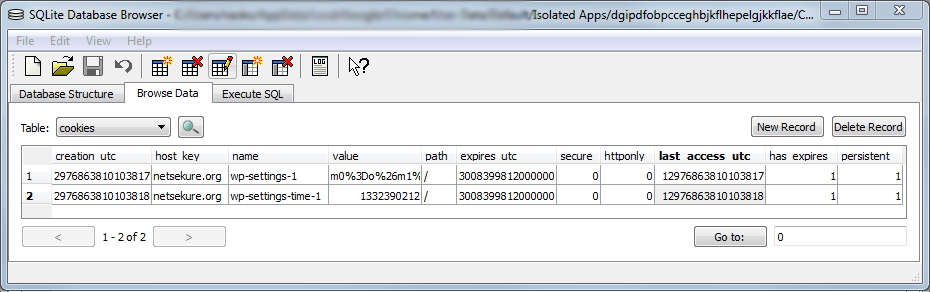
<p>In addition to seeing my blog being treated differently, I wanted to be sure that cookies are not shared with the generic browser storage, so I made sure to delete all cookies for my own domain in the &ldquo;Cookies and Other Data&rdquo; settings panel. As expected, but still to my surprise, the site continued functioning, since deleting the cookies only affected the general browser storage and my isolated app cookies were not cleared. This intrigued me as to where those cookies are being stored. It turns out, since this is still just an experimental feature, there is no UI to show the storage for the isolated app yet. If you want to prove this to yourself, just like I wanted to, you have to use a tool to let you peek into a SQLite database, which stores those cookies in a file very cleverly named - Cookies. The Cookies db and the cache are located in the directory for your current profile in a subdirectory &ldquo;Isolated Apps&rdquo; followed by the unique ID of the app, as generated by Chrome. You can find the ID on the Extensions page, if you expand to see the details for the web app you&rsquo;ve &ldquo;installed&rdquo;. In my case on Windows, the full directory is &ldquo;<em>%localappdata%\Google\Chrome\User Data\Default\Isolated Apps\dgipdfobpcceghbjkflhepelgjkkflae</em>&rdquo;. Here is an example of the cookies I had when I went and logged into my blog:</p>

<p><img src="http://netsekure.org/files/2012/03/SQLiteIsolatedCookies.png"></p>

<p>As you can see, there are only two cookies, which were set by WordPress and no other cookies are present.</p>

<p>Now, after using isolated apps for 30 days, I haven&rsquo;t found anything that was broken by this type of isolation. The sites I&rsquo;ve included in my testing, besides my blog, are bankofamerica.com, americanexpress.com, and fidelity.com*. The goal now is get this to more usable state, where you don&rsquo;t need to be a Chrome expert to use it ;).</p>

<h6>* Can&rsquo;t wait for all the phishing emails now to start arriving ;)</h6>
]]></content>
  </entry>
  
  <entry>
    <title type="html"><![CDATA[Pass-The-Hash vs cookie stealing]]></title>
    <link href="http://netsekure.org/2011/11/pass-the-hash-vs-cookie-stealing/"/>
    <updated>2011-11-04T00:00:00-07:00</updated>
    <id>http://netsekure.org/2011/11/pass-the-hash-vs-cookie-stealing</id>
    <content type="html"><![CDATA[<p>I saw a few talks at the BlueHat conference at Microsoft and the funniest of all was Joe McCray&rsquo;s (<a href="https://twitter.com/j0emccray">@j0emccray</a>) &ldquo;You Spent All That Money And You Still Got Owned????&rdquo;. At some point, he touched on <a href="http://en.wikipedia.org/wiki/Pass_the_hash">Pass-The-Hash</a> attacks and asked why those can&rsquo;t be prevented. That struck me as an interesting question and an analogy popped in my head:</p>

<p>&ldquo;pass-the-hash attacks are functionally equivalent to cookie stealing attacks&rdquo;</p>

<p>If you think about the pass-the-hash attack, it requires administrator privileges, which means you can get LocalSystem level privileges, at which point you own the operating system. Then you extract the user&rsquo;s hash out of memory or from the SAM database and you inject them into the attacker&rsquo;s machine. Then you rely on single-sign on built on top of NTLM/Kerberos to authenticate to remote resources.</p>

<p>What if we assume the following mapping: OS -> Browser, LocalSystem code execution -> Browser code execution, User&rsquo;s hash -> User&rsquo;s cookie, Single Sign On -> HTTP session with cookies?</p>

<p>It can be easily observed that the pass-the-hash attack is equivalent to attacker having code execution in the context of the browser, stealing the user&rsquo;s cookies, injecting them into the attacker&rsquo;s browser, and accessing remote resources. Actually, in the web world, one doesn&rsquo;t even need code execution in the browser to steal the user&rsquo;s cookies, it can be done through purely web based attacks.</p>

<p>Is it possible to defend against attacker using your cookies? It is extremely hard, because to the remote server, your cookie is <strong>*you*</strong>. From that perspective, a Windows domain is no different than web HTTP domain, so remote resources have no way of telling apart the real you and someone having your token, be it a password hash or a cookie. I haven&rsquo;t gone through the thought experiment of mapping best practices for securing against cookie stealing attacks to see if those will nicely map into best practices for defending against pass-the-hash attacks, so I&rsquo;d leave that as an exercise for the reader.</p>
]]></content>
  </entry>
  
  <entry>
    <title type="html"><![CDATA[How to approach fixing the TLS trust model]]></title>
    <link href="http://netsekure.org/2011/08/how-to-approach-fixing-the-tls-trust-model/"/>
    <updated>2011-08-29T00:00:00-07:00</updated>
    <id>http://netsekure.org/2011/08/how-to-approach-fixing-the-tls-trust-model</id>
    <content type="html"><![CDATA[<p>TLS is an exciting protocol and its wide deployment makes it even more interesting to work on. It has been said many times that the success of online commerce is due to the success of SSL/TLS and the fact that people felt safe in submitting their credit card information over the Internet. These days a lot of people have been speaking openly about how broken the TLS trust model is because of its reliance on Internet PKI and the Certificate Authorities infrastructure and there is some truth to that. We have seen <a href="http://www.comodo.com/Comodo-Fraud-Incident-2011-03-23.html" title="Comodo Report of Incident - Comodo detected and thwarted an intrusion on 26-MAR-2011">two</a> <a href="http://googleonlinesecurity.blogspot.com/2011/08/update-on-attempted-man-in-middle.html" title="An update on attempted man-in-the-middle attacks">cases</a> already where CAs trusted by all browsers have issued fraudulent certificates for high profile sites. Those incidents revealed two key problems in the existing TLS infrastructure today:</p>

<ul>
<li>Any CA can issue a certificate for any web site on the Internet, which I call &ldquo;certificate binding&rdquo; problem</li>
<li>Revocation checking as deployed is <a href="http://www.imperialviolet.org/2011/03/18/revocation.html" title="Revocation doesn't work">ineffective</a></li>
</ul>


<p>To counteract these deficiencies, multiple proposals have either existed or emerged. The most notable two are using DNSSEC for certificate binding and Convergence, which is based on independent system of notaries. While both have merits, I believe both have sufficient problems that will prevent them from being deployed widely, which is required for any successful change.</p>

<div>
  <strong>DNSSEC</strong>
</div>


<div>
  Using DNSSEC for storing information about the server cert is actually very appealing. The admin is in control of which cert is deployed and controls the DNS zone for the site, so it makes sense to be able to use the DNS zone information to control trust. There is even a working group inside IETF to work on such <a title="Using Secure DNS to Associate Certificates with Domain Names For TLS" href="https://datatracker.ietf.org/doc/draft-ietf-dane-protocol/">proposal</a>. The problems with DNSSEC are multiple though, here I list just a few:
</div>


<div>
  <ul>
    <li>
       It is not as widely deployed yet, but that is being fixed as we speak
    </li>
    <li>
      Client stub resolvers don&#8217;t actually verify the DNSSEC signature, rather rely on the DNS server to do the verification. This opens the client to attack, if a man-in-the-middle is between the client and its DNS server.
    </li>
    <li>
      There is non-zero amount of corporate networks, which do not allow DNS resolution of public Internet addresses. In such environments, the clients rely on the proxy to do the public Internet DNS resolution. This will break DNSSEC based approach, as clients don&#8217;t have access to the DNS records.
    </li>
    <li>
      DNSSEC is yet another trust hierarchy, which is not much different than the current PKI on the web, just a different instance.
    </li>
  </ul>
</div>


<p><strong>Convergence<br/>
</strong><a href="http://www.thoughtcrime.org/">Moxie Marlinspike</a> has the right idea about trust agility and his proposal, which he calls <a href="http://convergence.io/">Convergence</a>, has a very good foundation. Where I believe it falls short is the fact that many corporate networks block outgoing traffic to a big portion of the Internet. Unless all notaries are white-listed for communication, traffic to those will be blocked, which will prevent Convergence from working properly. Also, the local caching creates a problem with timely revocation - if a certificate is found to be compromised, then until the cache expires, it will still be treated as a valid one.</p>

<div>
  <strong>My take</strong>
</div>


<div>
  I actually don&#8217;t want to introduce any new methods of doing certificate validation. My goal is to point out a solution pattern that can be used to make any scheme actually deployable and satisfying most (if not all) cases. There are few basic properties any scheme should have:
</div>


<div>
  <ol>
    <li>
      All information needed for doing trust verification should be available if connectivity to the server is available
    </li>
    <li>
      Certificate should be bound to the site, such that there is 1-to-1 mapping between the cert and the site.
    </li>
    <li>
      A fresh proof of validity must be supplied
    </li>
  </ol>
  
  <p>
    There is already existing and deployed, although rather rarely, part of TLS called OCSP stapling. It does something very simple - the TLS server performs the OCSP request, receives the response, and then supplies that response as part of the TLS handshake, the last part being the most crucial. The inclusion of the OCSP response as a TLS message removes all of the network problems that the currently proposed solutions face. As long as the client can get a TLS connection to the server, trust validation data can be retrieved. This brings property 1 to the table. In addition, OCSP responses are short lived, which satisfies property 3 as well. So the only missing piece is the 1-to-1 property.
  </p>
  
  <p>
    So, there are two ways the problem can be approached - either bring certificate binding to OCSP somehow, or use any other method to provide certificate binding. The latter can actually be achieved rather easily with minimal changes to clients and servers. <a title="RFC 4366" href="http://tools.ietf.org/html/rfc4366">RFC 4366</a>, <a title="Certificate Status Request" href="http://tools.ietf.org/html/rfc4366#section-3.6">Section 3.6</a> describes the Certificate Status Request extension, which is the underlying protocol messaging of how OCSP stapling is implemented. The definition of the request message is:
  </p>
</div>


<div>
  <pre>      struct {
          CertificateStatusType status_type;
          select (status_type) {
              case ocsp: OCSPStatusRequest;
          } request;
      } CertificateStatusRequest;

      enum { ocsp(1), (255) } CertificateStatusType;</pre>
</div>


<p>The structure is extensible allowing for any other type of certificate status to be requested, as long as it is defined. I can easily see this message defining DNSSEC and Convergence as values of CertificateStatusType, then define the appropriate format of the request sent by the client. Conveniently, the response from the server is also very much extensible:</p>

<div>
  <pre>      struct {
          CertificateStatusType status_type;
          select (status_type) {
              case ocsp: OCSPResponse;
          } response;
      } CertificateStatus;

      opaque OCSPResponse&lt;1..2^24-1&gt;;</pre>
</div>


<p>Currently, the only value defined is for OCSP response, which is treated as opaque value as far as TLS is concerned. Nothing prevents whatever information the above proposals return from being transmitted as opaque data to the client.</p>

<p>Just like Moxie explored in his presentation, using the server to do the work of retrieving trust verification data preserves the privacy of the client. It does put some extra burden on the server to have proper connectivity, but that is much more manageable and totally under the control of the administrator.</p>

<p>It is true that there will have to be change implemented by both clients and servers which that will take time. I fully acknowledge that fact. I do believe though, that using the Certificate Status Request is the most logical piece of infrastructure to use to avoid all possible network related problems and provide an inline, fresh, binding trust verification data from the server to the client.</p>

<p>One thing I have not yet answered to myself is - how do we make any new model to fail safe. Having hard failure and denying the user access has been problem forever, but if we keep on failing unsafe, we will continue chasing the same problem into the future.</p>

<div>
  So in conclusion, for any solution to fixing the TLS trust model must satisfy the following:
</div>


<div>
  <ul>
    <li>
      Provide timely/fresh revocation information
    </li>
    <li>
      Work in all network connectivity scenarios
    </li>
    <li>
      Preserve the client privacy
    </li>
  </ul>
  
  <div>
    Ideally, it will also fail safe :)
  </div>
</div>


]]></content>
  </entry>
  
  <entry>
    <title type="html"><![CDATA[TLS Client Authentication and Trusted Issuers List]]></title>
    <link href="http://netsekure.org/2011/04/tls-client-authentication-and-trusted-issuers-list/"/>
    <updated>2011-04-29T00:00:00-07:00</updated>
    <id>http://netsekure.org/2011/04/tls-client-authentication-and-trusted-issuers-list</id>
    <content type="html"><![CDATA[<p>One of the common questions I&rsquo;ve seen asked lately is related to TLS client authentication, which likely means more people are interested in stronger client authentication. The problem people are hitting is described in <a href="http://support.microsoft.com/kb/933430" title="Clients cannot make connections if you require client certificates on a Web site or if you use IAS in Windows Server 2003">KB 933430</a>, where the message the server sends to the client to request client authentication is being trimmed. Let&rsquo;s look at why this occurs and what are the possible solutions, but first some background.</p>

<p>When TLS server is configured to ask for client authentication, it sends as part of the handshake the TLS CertificateRequest message. The <a href="http://tools.ietf.org/html/rfc5246" title="The Transport Layer Security (TLS) Protocol Version 1.2">TLS 1.2 RFC</a> defines the message as follows:</p>

<pre>      struct {
          ClientCertificateType certificate_types&lt;1..2^8-1&gt;;
          SignatureAndHashAlgorithm
            supported_signature_algorithms&lt;2^16-1&gt;;
          DistinguishedName certificate_authorities&lt;0..2^16-1&gt;;
      } CertificateRequest;</pre>


<p>where the supported_signature_algorithms is addition in the 1.2 version of the TLS protocol. The certificate_authorities part of the message is further defined:</p>

<pre>opaque DistinguishedName&lt;1..2^16-1&gt;;</pre>


<p>When the server sends this message, it optionally fills in the certificate_authorities part of the message with a list of distinguished names of acceptable CAs on the server. The main reason for this list is for the server to help the client in narrowing down the set of acceptable certificates to choose from. For example, if the server only accepts certificates issued by the company private CA, there is no need for the client to send a certificate issued by a public CA, as the server won&rsquo;t trust it. Nothing in the RFC prevents the client from sending any certificate, but it is in the best interest of the client to send appropriate certificate.</p>

<p>On Windows, the way the TLS is implemented, the server picks all the certificates that are present in the &ldquo;Local Computer&rdquo; &ldquo;Trusted Root Certification Authorities&rdquo; store (or in short the local machine root store). With Windows Server 2008 and later, the default list of trusted authorities is very small as I&rsquo;ve described in <a href="http://netsekure.org/2011/04/automatic-ca-root-certificate-updates-on-windows/" title="Automatic CA root certificate updates on Windows">a previous post</a>, so including those distinguished names in the message does not pose a problem. However, if the server has most of the trusted roots installed or has additional root certificates, it is possible for the combined length of the distinguished names to exceed the limit of the TLS record size, which is 2<sup>14</sup> (16384) bytes. The TLS standard supports this, as it breaks messages up into records and a single message can span multiple records - this is called record fragmentation. Windows does not implement this part of the RFC though, so it cannot send messages that are bigger than what a TLS record can hold. In most cases this works just fine, but in this particular instance it is a problem.</p>

<p>Now, what can be done to solve this problem. The are two solutions - either decrease the list of root certificates in the message or do not send that list at all (allowed by the RFC). The former approach is possible, but is more error prone and I wouldn&rsquo;t recommend it for most people. I would argue that the latter approach is the preferred one, but I always get backlash when I propose this. If one were to think about the original purpose of this message and the way Windows has implemented this, it will be easier to understand why this is better. Remember:</p>

<ul>
<li>the server wants to &ldquo;help&rdquo; the client do an informed decision on which certificate to send as its identity</li>
<li>Windows sends the contents of the local machine root store as the list</li>
</ul>


<p>If we take those two factors together, the end result is that the server is not helping *at all* the client to make a good decision.  A few sources - <a href="http://netsekure.org/2010/04/most-common-trusted-root-certificates/" title="Most common trusted root certificates">my own</a> <a href="http://netsekure.org/2010/05/results-after-30-days-of-almost-no-trusted-cas/" title="Results after 30 days of (almost) no trusted CAs">research</a>, <a href="http://blog.ivanristic.com/Qualys_SSL_Labs-State_of_SSL_InfoSec_World_April_2011.pdf" title="Qualys SSL Labs State of SSL InfoSec World April 2011">ssllabs.com&rsquo;s SSL Survey</a>, and the <a href="https://www.eff.org/observatory" title="The EFF SSL Observatory">EFF SSL Observatory</a> - point out that 10-15 root CAs issue the majority of the certificates seen on the web, therefore if we send 16k worth of these, the probability that any certificate the client has is *not* issued by someone in the list is close to zero. Therefore, in this configuration, the list the server presents to the client doesn&rsquo;t effectively filter down the set of certificates on the client. It is almost equivalent to sending an empty list to the client and ask it to chose randomly.</p>

<p>In short, if you are hitting this problem, you are better of using Method 3 described in <a href="http://support.microsoft.com/kb/933430" title="Clients cannot make connections if you require client certificates on a Web site or if you use IAS in Windows Server 2003">KB 933430</a> and setting SendTrustedIssuerList to 0, which disables sending of the list of CAs than any other method.</p>
]]></content>
  </entry>
  
  <entry>
    <title type="html"><![CDATA[Automatic CA root certificate updates on Windows]]></title>
    <link href="http://netsekure.org/2011/04/automatic-ca-root-certificate-updates-on-windows/"/>
    <updated>2011-04-15T00:00:00-07:00</updated>
    <id>http://netsekure.org/2011/04/automatic-ca-root-certificate-updates-on-windows</id>
    <content type="html"><![CDATA[<p>I was recently listening to <a href="http://twitter.com/nocombat" title="Chris Palmer">Chris Palmer</a> talking about SSL on the <a href="http://pauldotcom.com/">PaulDotCom</a> <a href="http://phobos.apple.com/WebObjects/MZStore.woa/wa/viewPodcast?id=91472687" title="PaulDotCom Security Weekly">podcast</a> and one thing caught my attention – the discussion on IE behavior with trusted roots certificates. It was discussed that IE is violating the “No-Write-Up” policy of the <a href="http://msdn.microsoft.com/en-us/library/bb625964.aspx" title="Windows Integrity Mechanism Technical Reference ">integrity level</a> (IL) mechanism in Windows. While the end effect looks like it, the inner workings of how this is accomplished is more complicated and the behavior is not restricted to IE.</p>

<p>Let’s start with some preliminary background information:</p>

<ul>
<li>Certificates are validated through a process of building a chain up to a trust anchor, the underlying of which is constructing a graph of nodes (certificates) and edges (issuance relationships) and then the graph is traversed to find all possible complete chains (in most cases just one). The smaller the graph is, the quicker it is to find a complete chain. Once the chain is complete, the certificate at the root of the chain is checked for trust. If the chain ends in a certificate present in the list of trusted root certificates and all other verifications pass, the certificate validation is successful.</li>
<li>Microsoft has a specific program called <a href="http://technet.microsoft.com/en-us/library/cc751157.aspx" title="Microsoft Root Certificate Program ">“Microsoft Root Certificate Program”</a>, which is how certificate authorities (CAs) submit their root certificates for inclusion in Windows. The end result of this program is a <strong>*fixed*</strong> list of root certificates that Windows considers trusted. The entire list is <a href="http://social.technet.microsoft.com/wiki/contents/articles/windows-root-certificate-program-members-list-all-cas.aspx">available on TechNet</a> and is updated whenever there are any changes. This list (or the equivalent of it at the time) was present in full in the root certificate store in Windows XP and earlier, but starting with Vista, this default list in the root certificate store is much smaller in order to increase performance while validating certificates. If a chain ends up in root certificate which is part of the Root Program but is not present in the list of trusted roots currently on the machine, Windows downloads the appropriate root certificate directly from Windows Update. The full process for all versions of the OS is described in a <a href="http://support.microsoft.com/kb/931125" title="Windows root certificate program members">KB article</a>. I’m not going to rehash the explanation of how it works, but the key point is that only those certificates accepted through the root program will be downloaded from Windows Update.</li>
</ul>


<p>The IE low integrity processes are not instructing the broker to do anything, it all happens under the hood in the crypto APIs. Now, here is why the IE behavior is observed. You go to a web site, which certificate is issued by a CA not yet in your trusted root list. Because IE uses the standard cryptography API that Windows provides, when certificate validation is performed, Windows itself (not IE, nor its broker process) goes and fetches the root certificate from Windows Update <strong>*if*</strong> that certificate is part of the Root Program. The same behavior will be seen for any program that is using the same API to do certificate validation. Chrome as far as I know uses the Windows crypto APIs to do certificate validation and relies on the trusted roots list from Windows, so if you browse with Chrome, you will see the exact same thing happen (though I haven’t verified it personally).</p>

<p>Some people have asked me how they can prevent Windows from going to Windows Update in such cases. This can be achieved by disabling automatic root update through policy as described on <a href="http://technet.microsoft.com/en-us/library/cc749331(WS.10).aspx" title="Certificate Support and Resulting Internet Communication in Windows Vista">TechNet</a>. It should be noted that one should exercise caution in doing so, because disabling root update means that Windows will no longer manage certificate trust for you. You will have to manage the set of trusted root certificates on your own. To that end, import the full list of CAs part of the Root Program such that those are available in the list of trusted roots. Microsoft provides a small program – rootsupd.exe, as part of <a href="http://support.microsoft.com/kb/931125" title="Windows root certificate program members">KB931125</a> which accomplishes this task. With this approach, you have control over trust management, but you need to keep the list updated whenever the set of roots in the root program changes. Microsoft has a <a href="http://social.technet.microsoft.com/wiki/contents/articles/windows-root-certificate-program-members.aspx" title="Windows Root Certificate Program Members">wiki page</a> which includes the information about new certificates that are part of an update. This page has RSS feed available which you can subscribe to so that you are notified of new updates, which makes keeping track of the updates an easy job.</p>

<p>I hope this helps explain how this all works and clarify that there is no real violation of the No-Write-Up policy, even though it might seem like it from high level.</p>
]]></content>
  </entry>
  
  <entry>
    <title type="html"><![CDATA[Fraudulent SSL certificates]]></title>
    <link href="http://netsekure.org/2011/03/fraudulent-ssl-certificates/"/>
    <updated>2011-03-23T00:00:00-07:00</updated>
    <id>http://netsekure.org/2011/03/fraudulent-ssl-certificates</id>
    <content type="html"><![CDATA[<p>As many people are reporting today, there have been a few SSL certificates issued to a fraudulent party. The Comodo CA had an <a href="http://blogs.comodo.com/it-security/data-security/the-recent-ca-compromise/" title="The Recent CA Compromise">RA account compromised</a> and used to issue certificates for some of the top web sites on the net. Their advisory is <a href="http://www.comodo.com/Comodo-Fraud-Incident-2011-03-23.html" title="Report of incident on 15-MAR-2011">http://www.comodo.com/Comodo-Fraud-Incident-2011-03-23.html</a>.</p>

<p>All major browsers are updating to blacklist those certificates and I&rsquo;d suggest you install updates as soon as you can to prevent possible attacks. Since none of the certificates have been seen in the wild, the chance is very very slim, but it doesn&rsquo;t hurt to do an update.</p>

<p>It was very interesting to see Jacob Appelbaum correlate multiple sources of information to<a href="https://blog.torproject.org/blog/detecting-certificate-authority-compromises-and-web-browser-collusion" title="Detecting Certificate Authority compromises and web browser collusion"> discover this independently</a> from the actual announcement. I&rsquo;ve been advocating that bad guys are already doing this, but very few people believe it. Now I hope this demonstrates that automated correlation can reveal lots of data. Furthermore Adam Langley has a <a href="http://www.imperialviolet.org/2011/03/18/revocation.html" title="Revocation doesn't work">good discussion</a> why revocation has problems and we should be looking into how to improve the state of it.</p>

<p>Advisories:</p>

<ul>
<li><a href="http://www.comodo.com/Comodo-Fraud-Incident-2011-03-23.html" title="Report of incident on 15-MAR-2011">Comodo</a></li>
<li><a href="http://www.microsoft.com/technet/security/advisory/2524375.mspx" title="rosoft Security Advisory (2524375)">Microsoft</a></li>
<li><a href="https://blog.mozilla.com/security/2011/03/22/firefox-blocking-fraudulent-certificates/" title="Firefox Blocking Fraudulent Certificates">Mozilla</a>, <a href="http://blog.mozilla.com/security/2011/03/25/comodo-certificate-issue-follow-up/" title="Comodo Certificate Issue – Follow Up">follow up</a></li>
<li><a href="http://www.us-cert.gov/current/index.html#fradulent_ssl_certificates" title="Fraudulent SSL Certificates">US-CERT</a></li>
<li><a href="http://googlechromereleases.blogspot.com/2011/03/stable-and-beta-channel-updates_17.html" title="Stable and Beta Channel Updates">Google</a></li>
</ul>

]]></content>
  </entry>
  
  <entry>
    <title type="html"><![CDATA[Windows SSL/TLS update for secure renegotiation]]></title>
    <link href="http://netsekure.org/2010/08/windows-ssltls-update-for-secure-renegotiation/"/>
    <updated>2010-08-25T00:00:00-07:00</updated>
    <id>http://netsekure.org/2010/08/windows-ssltls-update-for-secure-renegotiation</id>
    <content type="html"><![CDATA[<p>Couple of weeks ago Microsoft released an update to the SSL/TLS stack to implement secure renegotiation as described in <a href="http://tools.ietf.org/html/rfc5746" title="Transport Layer Security (TLS) Renegotiation Indication Extension">RFC 5746</a>. The <a href="http://support.microsoft.com/kb/980436" title="MS10-049: Vulnerabilities in SChannel could allow remote code execution">Microsoft KB</a> article describes the three settings controlling the behavior of the patch, but a bit more detail can be useful.</p>

<p>A bit of background first. TLS extensions are a method of extending the TLS protocol without having to change the specification of the core protocol and are described in <a href="http://tools.ietf.org/html/rfc4366" title="Transport Layer Security (TLS) Extensions">RFC 4366</a>. It is defined as arbitrary extra data that can be appended to the ClientHello and/or ServerHello messages (which are the first messages sent by each side). Servers are supposed to ignore data following the ClientHello if they don&rsquo;t understand it.</p>

<p>Since the TLS extensions were not a formal RFC in the past, some server implementations were written to fail requests which have more data following the ClientHello message, which makes them non-interoperable with clients that send TLS extensions. This is the precise reason why RFC 5746 has adopted the idea of Signaling Cipher Suite Value (SCSV) to avoid breaking interoperability with servers not accepting TLS extensions. The recommended approach, though, is to use the TLS extension defined by the RFC.</p>

<p>Now here are the important details. By default, any version of Windows prior to Vista did not send TLS extensions when using the TLSv1.0 protocol. With the new update, this has changed and if TLSv1.0 is enabled, then the renegotiation indication extension will be sent as part of the TLS handshake, as recommended. So the small set of servers (no one that I know of knows the actual percentage of such servers) which do not tolerate this behavior will cause interoperability problems. This is where the UseScsvForTls setting described in the Microsoft KB comes in. Setting the registry key to non-zero value will cause the SSL/TLS stack to generate TLS ClientHello messages containing SCSV and without extensions, so interoperability with such servers can be restored. As far as the other two keys, AllowInsecureRenegoClients and AllowInsecureRenegoServers, they control the compatible vs strict mode and will not make any difference on the structure of the messages on the wire. The only effect is whether communication is allowed to continue with unpatched party or not.</p>
]]></content>
  </entry>
  
  <entry>
    <title type="html"><![CDATA[PhoneFactor WordPress plugin]]></title>
    <link href="http://netsekure.org/2010/06/phonefactor-wordpress-plugin/"/>
    <updated>2010-06-16T00:00:00-07:00</updated>
    <id>http://netsekure.org/2010/06/phonefactor-wordpress-plugin</id>
    <content type="html"><![CDATA[<p>I have recently stumbled upon the <a href="http://wordpress.org/extend/plugins/phonefactor/" title="PhoneFactor plugin for WordPress">plugin</a> <a href="http://www.phonefactor.com/" title="PhoneFactor">PhoneFactor</a> has for <a href="http://wordpress.org/" title="WordPress">WordPress</a> and decided to give it a shot, knowing the idea behing the PhoneFactor authentication model. The install was smooth, since WordPress does a good job on integrating installing plugins into the admin panel. There were a few issues that I hit once it was installed, but they were mainly caused by my own customizations to WordPress to force SSL on the admin panel and some other security enhancements.</p>

<p>If you are like me and rely heavily on SSL for the admin area, you might already know and be frustrated by the busted defaults for most plugins. In their defense, it is a WordPress issue, since their built in functions return http based URLs instead of http<strong>s</strong> when hosted over SSL. I believe this is being addressed in 3.0, but so far I&rsquo;ve had to patch each new release of WP to get safety, but I digress.</p>

<p>The only issue with the plugin itself is that it reported the username I picked as used, even though it was not. You can safely ignore this or if you want to do it right, apply the following patch:</p>

<pre>---&lt;
@@ -171,6 +171,7 @@ pf.testNumberCompleted = function(data) {
                                                        CURLOPT_POST =&gt; true,
                                                        CURLOPT_POSTFIELDS =&gt; $post,                                                                                                                       CURLOPT_RETURNTRANSFER =&gt; TRUE,
+                                                       CURLOPT_SSL_VERIFYPEER =&gt; false                                                                                                            );                                                                                                                                                 $curl = curl_init();
                                                foreach ($curl_options as $option =&gt; $value) curl_setopt($curl, $option, $value);
---&lt;
</pre>


<p>With that taken care of, one can sign up for an account right from the plugin. Once it is all said and done this plugin is AWESOME. Now I can actually authorize each login to my blog and ensure that even if someone were to get their hands on my password, they won&rsquo;t be able to login to the blog. And the best part is that the call feature is actually <strong>free</strong>!</p>

<p>Thanks PhoneFactor for a great plugin!</p>
]]></content>
  </entry>
  
  <entry>
    <title type="html"><![CDATA[Privilege separation in WordPress]]></title>
    <link href="http://netsekure.org/2010/05/privilege-separation-in-wordpress/"/>
    <updated>2010-05-27T00:00:00-07:00</updated>
    <id>http://netsekure.org/2010/05/privilege-separation-in-wordpress</id>
    <content type="html"><![CDATA[<p>A <a href="http://twitter.com/jeremiahg/status/14796993478" title="WordPress disable xmlrpc.php">recent retweet</a> by <a href="http://jeremiahgrossman.blogspot.com/" title="Jeremiah Grossman's blog">Jeremiah Grossman</a> got me thinking. Why doesn&rsquo;t <a href="http://wordpress.org/" title="WordPress">WordPress</a> implement privilege separation in their blog engine? After all it is fairly simple and can be implemented in a few lines of code.</p>

<p>I don&rsquo;t know the reason to be honest, as this is one of the basic rules of security. Few months ago I did it for my blog, since I don&rsquo;t see a valid reason why anyone coming across the Internet needs to have &ldquo;drop table&rdquo; privilege or similar on my blog&rsquo;s database. I looked around for a convenient mailing list to post my idea to and unfortunately I couldn&rsquo;t find one, so I gave up on trying to message the idea directly to WordPress developers, but now I&rsquo;ve decided to at least post it for people to take advantage of it.</p>

<p>Here is what I have done that should give you basic level of privilege separation with just a simple WordPress tweak.<br/>
First, you need to have the two separate database users - admin and public. We also need to assign the proper privileges/permissions (after all this is the main idea):</p>

<p style="text-align: left;">
  public -> db: [SELECT,INSERT]<br /> admin -> db: [SELECT,INSERT,UPDATE,CREATE,DELETE,ALTER,DROP,INDEX,CREATE TEMPORARY TABLES,LOCK TABLES,CREATE VIEW,SHOW VIEW]
</p>


<p>Since I have comments enabled, I had to give the public user the INSERT privilege, but at least I have taken away the 10 extra privs away from it. If you don&rsquo;t allow comments on the blog, you can even remove the INSERT functionality, though I haven&rsquo;t tested this one and don&rsquo;t know if anything else would break.</p>

<p>The only other thing left to do is configure WordPress to pick the right database user. This is accomplished easily through wp-config.php:</p>

<pre>if ( defined('WP_ADMIN') || defined('DOING_CRON') )  {
  define('DB_USER', 'admin');
  define('DB_PASSWORD', 'admin_password');
} else {
  define('DB_USER', 'public');
  define('DB_PASSWORD', 'public_password');
}</pre>


<p>I&rsquo;ve only had this customization interfere once in my almost half year since I&rsquo;ve implemented it. It was during WordPress upgrade, which required a change to the database schema. In such cases, it is trivial to restore back to the default behavior for the duration of the upgrade and then go back to separate users.</p>

<p>I hope this helps people reduce some of the attack surface on their blogs and ideally WordPress will do this natively in the future.</p>
]]></content>
  </entry>
  
  <entry>
    <title type="html"><![CDATA[Results after 30 days of (almost) no trusted CAs]]></title>
    <link href="http://netsekure.org/2010/05/results-after-30-days-of-almost-no-trusted-cas/"/>
    <updated>2010-05-07T00:00:00-07:00</updated>
    <id>http://netsekure.org/2010/05/results-after-30-days-of-almost-no-trusted-cas</id>
    <content type="html"><![CDATA[<p>Today marks the 30th day since I removed all the root certificates for trusted certificate authorities. It was an interesting one month and I&rsquo;ve learned a bunch. The main takeaway from this experiment is that I don&rsquo;t need 3 digit number of trusted CAs in my browser. Again, this is person specific and US centric, but the total count as of today is <strong>10</strong>! The list of subject names and signatures follows for the ones interested in the exact list.</p>

<p>CN=Equifax Secure Global eBusiness CA-1, O=Equifax Secure Inc., C=US<br/>
7e784a101c8265cc2de1f16d47b440cad90a1945</p>

<p>OU = VeriSign Trust Network, OU = &ldquo;&copy; 1998 VeriSign, Inc. - For authorized use only&rdquo;, OU = Class 3 Public Primary Certification Authority - G2, O = &ldquo;VeriSign, Inc.&rdquo;, C = US<br/>
85371ca6e550143dce2803471bde3a09e8f8770f</p>

<p>OU=Class 3 Public Primary Certification Authority, O=VeriSign, Inc., C=US<br/>
742c3192e607e424eb4549542be1bbc53e6174e2</p>

<p>OU=Equifax Secure Certificate Authority, O=Equifax, C=US<br/>
d23209ad23d314232174e40d7f9d62139786633a</p>

<p>CN=GTE CyberTrust Global Root, OU=&ldquo;GTE CyberTrust Solutions, Inc.&rdquo;, O=GTE Corporation, C=US<br/>
97817950d81c9670cc34d809cf794431367ef474</p>

<p>CN=Entrust.net Secure Server Certification Authority, OU=&copy; 1999 Entrust.net Limited, OU=www.entrust.net/CPS incorp. by ref. (limits liab.), O=Entrust.net, C=US<br/>
99a69be61afe886b4d2b82007cb854fc317e1539</p>

<p>CN=AddTrust External CA Root, OU=AddTrust External TTP Network, O=AddTrust AB, C=SE<br/>
02faf3e291435468607857694df5e45b68851868</p>

<p>E=premium-server@thawte.com, CN=Thawte Premium Server CA, OU=Certification Services Division, O=Thawte Consulting cc, L=Cape Town, S=Western Cape, C=ZA<br/>
627f8d7827656399d27d7f9044c9feb3f33efa9a</p>

<p>OU=Go Daddy Class 2 Certification Authority, O=&ldquo;The Go Daddy Group, Inc.&rdquo;, C=US<br/>
2796bae63f1801e277261ba0d77770028f20eee4</p>

<p>CN = GlobalSign Root CA, OU = Root CA, O = GlobalSign nv-sa, C = BE<br/>
b1bc968bd4f49d622aa89a81f2150152a41d829c</p>

<p>The last one I&rsquo;ve included for completeness, since I don&rsquo;t really need it, but I had to enable it to access openssl.org over https. It is currently not trusted.</p>

<p>While this is a good list of certs to enable for security geeks like myself, I&rsquo;m not quite sure how feasible this is today for the average user, so I wouldn&rsquo;t recommend doing this to your parents' computer. Even for me it was hard to realize that application failures (such as twhirl completely stopping to work) are due to a root certificate no longer being trusted and SSL connections failing. I also had to look at the wire traffic on a few occasions where the UI would never expose the &ldquo;I want to see which certificate is failing&rdquo; option.</p>

<p>One needs to be very careful which certs are disabled. Since it is hard to troubleshoot failures that result from disabling trusted roots, reading up and getting familiar with how certificates work is a great idea. Firefox has its own certificate storage, completely separate from the OS, so messing with it is not as big of an issue, as any errors are isolated to Mozilla applications. Here are some resources for Windows (which affects IE and Chrome):</p>

<ul>
<li>There is a list of mandatory certificates that Windows needs to operate, which is listed <a href="http://support.microsoft.com/kb/293781" title="Trusted root certificates that are required by Windows Server 2008 R2, by Windows 7, by Windows Server 2008, by Windows Vista, by Windows Server 2003, by Windows XP, and by Windows 2000">here</a>.</li>
<li>There is a <a href="http://technet.microsoft.com/en-us/library/cc749331(WS.10).aspx" title="Certificate Support and Resulting Internet Communication in Windows Vista">great overview </a>of how the trusted roots certificates work on Windows and explains why people see things &ldquo;change&rdquo; under the hood.</li>
<li>Also, in newer versions there seem to be a lot more control on <a href="http://technet.microsoft.com/en-us/library/cc731638(WS.10).aspx" title="Manage Certificate Path Validation">how certificates are validated</a> and what roots are trusted.</li>
<li>The <a href="http://support.microsoft.com/kb/931125" title="Windows root certificate program members">list of CAs</a> that Windows trusts.</li>
</ul>


<p>I hope this information is helpful to people. Feel free to ping me with questions you might have related to this small project.</p>
]]></content>
  </entry>
  
  <entry>
    <title type="html"><![CDATA[How to disable trusted root certificates]]></title>
    <link href="http://netsekure.org/2010/04/how-to-disable-trusted-root-certificates/"/>
    <updated>2010-04-14T00:00:00-07:00</updated>
    <id>http://netsekure.org/2010/04/how-to-disable-trusted-root-certificates</id>
    <content type="html"><![CDATA[<p>As part of my testing of how many trusted root certificates I need for my day-to-day activities, I needed to ensure I don&rsquo;t trust any certificate authorities. There is a <a href="http://www.mail-archive.com/dev-security@lists.mozilla.org/msg00095.html" title="Re: Is NSSCKBI.DLL safe?">great post by Nelson Bolyard</a> to one of the security mailing lists of Mozilla, which explains why one should not delete CA certificates, but rather disable them. The main take away is that there is a big difference between the statements &ldquo;I don&rsquo;t know you&rdquo; (if you remove the certificate) and &ldquo;I know you and I don&rsquo;t trust you&rdquo; (disabling the certificate). Some browsers also handle these errors differently.</p>

<p>The different browsers store certificates differently. IE, Chrome, and I believe Safari as well (haven&rsquo;t tested it) on Windows use the OS built-in certificate infrastructure, while Firefox uses its own certificate storage. As such, here are the steps you need to take for the two different cases:</p>

<h3>IE, Chrome (Safari?)</h3>

<p>You need to run the certmgr.msc utility (either through Start-&gt;Run/Search or from a command prompt). This will launch the UI used to manage the certificate stores in Windows for the current user.</p>

<div id="attachment_228" style="width: 497px" class="wp-caption alignnone">
  <a href="http://netsekure.org/files/2010/04/certmgr-user-stores.png"><img class="size-full wp-image-228" title="CertMgr Certificate Stores" src="http://netsekure.org/files/2010/04/certmgr-user-stores.png" alt="" width="487" height="375" /></a><p class="wp-caption-text">
    CertMgr Certificate Stores
  </p>
</div>


<p>The &ldquo;Third-Party Root Certification Authorities&rdquo; stores all the trusted 3rd party CAs. You will find either a fairly small set of those if Windows hasn&rsquo;t downloaded the full list, or quite a bit of them after the full list has arrived. To disable the root certificates, select the ones you want and drag them to the &ldquo;Untrusted Certificates&rdquo; store and drop them under the &ldquo;Certificates&rdquo; subfolder. This instructs the certificate infrastructure in Windows to not trust these certificates. The result is that even though you have the certificates in other stores, the operations will fail. The &ldquo;Untrusted Certificates&rdquo; store trumps all others, so you don&rsquo;t have to worry about forgetting a certificate somewhere else.</p>

<p>Keep in mind that doing this in Windows will affect all programs that use SSL/TLS and certificates. I&rsquo;ve broken my twitter client for example by removing all CAs from the trusted list : ).</p>

<h3>Firefox</h3>

<p>You will need to click on Tools-&gt;Options, select the Advanced category, select the Encryption, click View Certificates, and click on the Authorities tab. This will open up a window with all the trusted certificate authorities. For each of those, once you select it, you can click on the &ldquo;Edit&rdquo; button and you will see a window that looks like this:</p>

<div id="attachment_230" style="width: 434px" class="wp-caption alignnone">
  <a href="http://netsekure.org/files/2010/04/firefox-trusted-ca.png"><img class="size-full wp-image-230" title="Firefox Trusted CA" src="http://netsekure.org/files/2010/04/firefox-trusted-ca.png" alt="" width="424" height="220" /></a><p class="wp-caption-text">
    Firefox Trusted CA
  </p>
</div>


<p>This CA is trusted for all 3 types of identification. To disable the certificate, just uncheck all the check boxes and click Ok:</p>

<div id="attachment_231" style="width: 432px" class="wp-caption alignnone">
  <a href="http://netsekure.org/files/2010/04/firefox-trusted-ca-disabled.png"><img class="size-full wp-image-231" title="Firefox Disabled" src="http://netsekure.org/files/2010/04/firefox-trusted-ca-disabled.png" alt="" width="422" height="218" /></a><p class="wp-caption-text">
    Firefox Disabled CA
  </p>
</div>


<p>The result is that this certificate is no longer trusted to vouch for the identity of anything. You need to repeat the process for all the certificates you want to disable and I don&rsquo;t know of an easy way to automate this. For the certificates listed as &ldquo;Builtin Object Token&rdquo;, <a href="http://extendedsubset.com/">Marsh Ray</a> has tried deleting them and claims that this results in disabling them (since they are built-in and cannot be deleted) after restarting Firefox.</p>

<p>After you have disabled the CA certificates, you can expect SSL/TLS connections to fail if the certificate is issued by a disabled CA.</p>

<p>Have fun browsing with minimized attack surface : )</p>
]]></content>
  </entry>
  
  <entry>
    <title type="html"><![CDATA[30 days with (almost) no trusted CAs]]></title>
    <link href="http://netsekure.org/2010/04/30-days-with-almost-no-trusted-cas/"/>
    <updated>2010-04-14T00:00:00-07:00</updated>
    <id>http://netsekure.org/2010/04/30-days-with-almost-no-trusted-cas</id>
    <content type="html"><![CDATA[<p>I&rsquo;ve decided to embark on a small project to determine what is the smallest set of trusted root certificates I need in my day-to-day life. I have disabled all trusted CAs in both IE and Firefox and will enable the needed root certificates as I go. So far I&rsquo;ve spent a week of this and have about 10 certificates, 3 of which were needed because I needed to pay my bills : ).</p>

<p>I will run in this mode for 30 days, at the end of which I will report how many root certificates I had to enable to allow me to go through life. In the meantime, I am tweeting every time I need to enable a CA along with the site that needed it.</p>

<p>It is a fun ride so far, so let&rsquo;s see where it is going to take me.</p>
]]></content>
  </entry>
  
  <entry>
    <title type="html"><![CDATA[Most common trusted root certificates]]></title>
    <link href="http://netsekure.org/2010/04/most-common-trusted-root-certificates/"/>
    <updated>2010-04-07T00:00:00-07:00</updated>
    <id>http://netsekure.org/2010/04/most-common-trusted-root-certificates</id>
    <content type="html"><![CDATA[<p>With the <a href="http://www.wired.com/threatlevel/2010/03/packet-forensics/" title="Law Enforcement Appliance Subverts SSL">press</a> <a href="http://www.crypto.com/blog/spycerts/" title="The Spy in the Middle">coverage</a> lately about governments being able to subvert SSL/TLS by coercing a certificate authority into issuing rogue certificates, I decided to do some data gathering in order to answer a simple question:</p>

<p><strong>How many trusted roots does the average person need in their browser?</strong></p>

<p>To answer the question, I wrote a small tool to collect the root cert for a list of sites and ran it on a sets of data - a mix of known SSL/TLS sites and hosts on the <a href="http://www.alexa.com/topsites" title="Alexa Top 500 Global Sites">Alexa Top 1 Million</a> list. So out of 350k hosts queried, I was able to collect 50812 entries. The stats are fairly interesting and somewhat expected. The number of certificate authorities that have issued more than 50 certificates for that set of data is 37.</p>

<p>While I was gathering the data, it became known that even <a href="http://groups.google.com/group/mozilla.dev.security.policy/browse_thread/thread/b6493a285ba79998?pli=1" title="Recommend Removing RSA Security 1024 V3 root certificate  authority">Mozilla includes some root certificates </a>that don&rsquo;t have complete clarity of ownership.</p>

<p>My plan now is to remove most of the CA root certificates that ship in browsers. It will be informative to see what breaks and how many issues I run into. After a month or so of usage, I will post the details and hopefully it will be an easy guide as to the smallest set of trusted CAs to have and not be impacted in daily business. Granted this will be a US centric list, most international users can probably add one or two trusted roots that are for CAs issuing country specific certificates.</p>

<p>What follows is the list of root certificates (also available as <a href="http://netsekure.org/files/trusted-roots.txt">text file</a>) sorted with decreasing popularity. The format is &ldquo;Number of issued certs | Friendly name | Subject&rdquo;.</p>

<pre>7519 | GeoTrust | OU=Equifax Secure Certificate Authority, O=Equifax, C=US
4277 | USERTrust | CN=AddTrust External CA Root, OU=AddTrust External TTP Network, O=AddTrust AB, C=SE
4007 | Go Daddy Class 2 Certification Authority | OU=Go Daddy Class 2 Certification Authority, O="The Go Daddy Group, Inc.", C=US
3701 | VeriSign Class 3 Public Primary CA | OU=Class 3 Public Primary Certification Authority, O="VeriSign, Inc.", C=US
2948 | USERTrust | CN=UTN-USERFirst-Hardware, OU=http://www.usertrust.com, O=The USERTRUST Network, L=Salt Lake City, S=UT, C=US
2649 | thawte | E=premium-server@thawte.com, CN=Thawte Premium Server CA, OU=Certification Services Division, O=Thawte Consulting cc, L=Cape Town, S=Western Cape, C=ZA
2077 |  | E=info@plesk.com, CN=plesk, OU=Plesk, O=Parallels, L=Herndon, S=Virginia, C=US
1898 | Equifax Secure Global eBusiness CA-1 | CN=Equifax Secure Global eBusiness CA-1, O=Equifax Secure Inc., C=US
1806 | VeriSign | OU=VeriSign Trust Network, OU="(c) 1998 VeriSign, Inc. - For authorized use only", OU=Class 3 Public Primary Certification Authority - G2, O="VeriSign, Inc.", C=US
1580 |  | E=webaster@localhost, CN=localhost, OU=none, O=none, L=Sometown, S=Someprovince, C=US
1461 |  | E=root@localhost.localdomain, CN=localhost.localdomain, OU=SomeOrganizationalUnit, O=SomeOrganization, L=SomeCity, S=SomeState, C=--
1378 | thawte | E=server-certs@thawte.com, CN=Thawte Server CA, OU=Certification Services Division, O=Thawte Consulting cc, L=Cape Town, S=Western Cape, C=ZA
1366 | VeriSign | CN=VeriSign Class 3 Public Primary Certification Authority - G5, OU="(c) 2006 VeriSign, Inc. - For authorized use only", OU=VeriSign Trust Network, O="VeriSign, Inc.", C=US
1189 |  | E=info@plesk.com, CN=plesk, OU=Plesk, O="SWsoft, Inc.", L=Herndon, S=Virginia, C=US
922 | Entrust | CN=Entrust.net Secure Server Certification Authority, OU=(c) 1999 Entrust.net Limited, OU=www.entrust.net/CPS incorp. by ref. (limits liab.), O=Entrust.net, C=US
902 | GlobalSign | CN=GlobalSign Root CA, OU=Root CA, O=GlobalSign nv-sa, C=BE
783 | GTE CyberTrust Global Root | CN=GTE CyberTrust Global Root, OU="GTE CyberTrust Solutions, Inc.", O=GTE Corporation, C=US
737 | CúOúMúOúDúO | CN=COMODO Certification Authority, O=COMODO CA Limited, L=Salford, S=Greater Manchester, C=GB
692 |  | E=ca@snakeoil.dom, CN=Snake Oil CA, OU=Certificate Authority, O="Snake Oil, Ltd", L=Snake Town, S=Snake Desert, C=XY
461 | DigiCert | CN=DigiCert High Assurance EV Root CA, OU=www.digicert.com, O=DigiCert Inc, C=US
394 | Starfield Class 2 Certification Authority | OU=Starfield Class 2 Certification Authority, O="Starfield Technologies, Inc.", C=US
264 |  | E=hostmaster@ispgateway.de, CN=webserver.ispgateway.de, O=ispgateway, L=Kempten, S=Bayern, C=DE
257 |  | E=info@parallels.com, CN=plesk, OU=Plesk, O="Parallels, Inc.", L=Herndon, S=Virginia, C=US
208 | Entrust (2048) | CN=Entrust.net Certification Authority (2048), OU=(c) 1999 Entrust.net Limited, OU=www.entrust.net/CPS_2048 incorp. by ref. (limits liab.), O=Entrust.net
198 | Trustwave | CN=SecureTrust CA, O=SecureTrust Corporation, C=US
168 |  | E=sslsign@lxlabs.com, CN=*.lxlabs.com, OU=web, O=lxlabs, L=WA, S=WA, C=IN
143 | thawte | CN=thawte Primary Root CA, OU="(c) 2006 thawte, Inc. - For authorized use only", OU=Certification Services Division, O="thawte, Inc.", C=US
101 |  | E=info@confixx.com, CN=confixx, OU=Confixx, O="SWsoft, Inc.", L=Herndon, S=Virginia, C=US
98 | StartCom Certification Authority | CN=StartCom Certification Authority, OU=Secure Digital Certificate Signing, O=StartCom Ltd., C=IL
92 |  | E=support@cacert.org, CN=CA Cert Signing Authority, OU=http://www.cacert.org, O=Root CA
87 | USERTrust | CN=UTN - DATACorp SGC, OU=http://www.usertrust.com, O=The USERTRUST Network, L=Salt Lake City, S=UT, C=US
71 | VeriSign | OU=Secure Server Certification Authority, O="RSA Data Security, Inc.", C=US
70 | Starfield Technologies | E=info@valicert.com, CN=http://www.valicert.com/, OU=ValiCert Class 2 Policy Validation Authority, O="ValiCert, Inc.", L=ValiCert Validation Network
64 |  | CN=localhost, OU=For testing purposes only, O=Apache HTTP Server
63 |  | E=admin@suresupport.com, CN=suresupport.com, OU=suresupport.com, O=suresupport.com, L=US, S=US, C=US
62 | SECOM Trust Systems CO LTD | OU=Security Communication RootCA1, O=SECOM Trust.net, C=JP
61 | Network Solutions | CN=Network Solutions Certificate Authority, O=Network Solutions L.L.C., C=US
</pre>


]]></content>
  </entry>
  
  <entry>
    <title type="html"><![CDATA[TLS overhead]]></title>
    <link href="http://netsekure.org/2010/03/tls-overhead/"/>
    <updated>2010-03-12T00:00:00-08:00</updated>
    <id>http://netsekure.org/2010/03/tls-overhead</id>
    <content type="html"><![CDATA[<p>Every so often I get the question – “What is the overhead incurred by using TLS?”. Strangely enough, I couldn’t find a straight answer by doing some searching on the web, so let’s explore the answer. The TLS handshake has multiple variations, but let’s pick the most common one – anonymous client and authenticated server (the connections browsers use most of the time). As per the <a href="http://tools.ietf.org/html/rfc5246" title="TLS 1.2 RFC">TLS standard</a> the <a href="http://tools.ietf.org/html/rfc5246#section-7.3" title="TLS 1.2 Handshake protocol">handshake looks as follows</a>:</p>

<pre>      Client                                               Server

      ClientHello                  --------&gt;
                                                      ServerHello
                                                      Certificate
                                   &lt;--------      ServerHelloDone
      ClientKeyExchange
      [ChangeCipherSpec]
      Finished                     --------&gt;
                                               [ChangeCipherSpec]
                                   &lt;--------             Finished
      Application Data             &lt;-------&gt;     Application Data
</pre>


<p>One thing to keep in mind that will influence the calculation is the variable size of most of the messages. The variable nature will not allow to calculate a precise value, but taking some reasonable average values for the variable fields, one can get a good approximation of the overhead. Now, let’s go through each of the messages and consider their sizes.</p>

<ul>
<li>ClientHello – the average size of initial client hello is about 160 to 170 bytes. It will vary based on the number of ciphersuites sent by the client as well as how many TLS ClientHello extensions are present. If session resumption is used, another 32 bytes need to be added for the Session ID field.</li>
<li>ServerHello – this message is a bit more static than the ClientHello, but still variable size due to TLS extensions. The average size is 70 to 75 bytes.</li>
<li>Certificate – this message is the one that varies the most in size between different servers. The message carries the certificate of the server, as well as all intermediate issuer certificates in the certificate chain (minus the root cert). Since certificate sizes vary quite a bit based on the parameters and keys used, I would use an average of 1500 bytes per certificate (self-signed certificates can be as small as 800 bytes). The other varying factor is the length of the certificate chain up to the root certificate. To be on the more conservative side of what is on the web, let’s assume 4 certificates in the chain. Overall this gives us about 6k for this message.</li>
<li>ClientKeyExchange – let’s assume again the most widely used case – RSA server certificate. This corresponds to size of 130 bytes for this message.</li>
<li>ChangeCipherSpec – fixed size of 1 (technically not a handshake message)</li>
<li>Finished – depending whether SSLv3 is used or TLS, the size varies quite a bit – 36 and 12 bytes respectively. Most implementations these days support TLSv1.0 at least, so let’s assume TLS will be used and therefore the size will be 12 bytes.</li>
</ul>


<p>Now that we have an average size of each message exchanged, we can calculate the average handshake size. One has to keep in mind that messages exchanged have TLS Record header for each record sent (5 bytes), as well as TLS Handshake header (4 bytes). The most common case can be simplified such that each arrow in the handshake diagram is a TLS Record, so we have 4 Records exchanged for total of 20 bytes. Each message has the handshake header (except the ChangeCipherSpec one), so we have 7 times the Handshake header for total of 28 bytes.</p>

<p><strong>The total overhead to establish a new TLS session comes to about 6.5k bytes on average </strong>(20 + 28 + 170 + 75 + 6000 + 130 + 2*1 + 2*12 = 6449).</p>

<p>TLS sessions once established can also be resumed. In the session resumption, some of the messages are omitted and the handshake looks as follows:</p>

<pre>      Client                                               Server

      ClientHello                  --------&gt;
                                                      ServerHello
                                               [ChangeCipherSpec]
                                   &lt;--------             Finished
      [ChangeCipherSpec]
      Finished                     --------&gt;
      Application Data             &lt;-------&gt;     Application Data</pre>


<p>The main difference here is that the ClientHello message will contain extra 32 bytes for the session ID it wants to resume.</p>

<p><strong>The total overhead to resume an existing TLS session comes to about 330 bytes on average </strong>(15 + 16 + 202 + 75 + 2*1 + 2*12 =332 ).</p>

<p>Now let’s look at the overhead on the wire for the encrypted application data. The data is carried in TLS Records over the wire, so there are 5 bytes of header. Since data is encrypted and integrity protected, there is additional overhead that is incurred. Let’s assume that the ciphersuite negotiated between the client and the server is TLS_RSA_WITH_AES_128_CBC_SHA, which is mandatory for TLS1.2 and hopefully will be commonly negotiated going forward. Since AES is a block cipher, it requires the data to be sized in multiple of the block size. TLS 1.0 defines the encrypted data with block cipher as:</p>

<pre>    block-ciphered struct {
        opaque content[TLSCompressed.length];
        opaque MAC[CipherSpec.hash_size];
        uint8 padding[GenericBlockCipher.padding_length];
        uint8 padding_length;
    } GenericBlockCipher;</pre>


<p>Since most implementations don’t use compression, we can assume the data is the same size. The MAC in this case is computed using SHA1, so the size will be 20 bytes. AES128 has a block size of 16 bytes, so the maximum padding we can add to the data will be 15 bytes.</p>

<p><strong>The total overhead of the encrypted data is about 40 bytes (20 + 15 + 5).</strong></p>

<p>It is easy to modify the above calculations to reflect more precisely the specifics of an environment, so this should be considered a basis for TLS overhead and not the authoritative answer to the question posed.</p>
]]></content>
  </entry>
  
</feed>